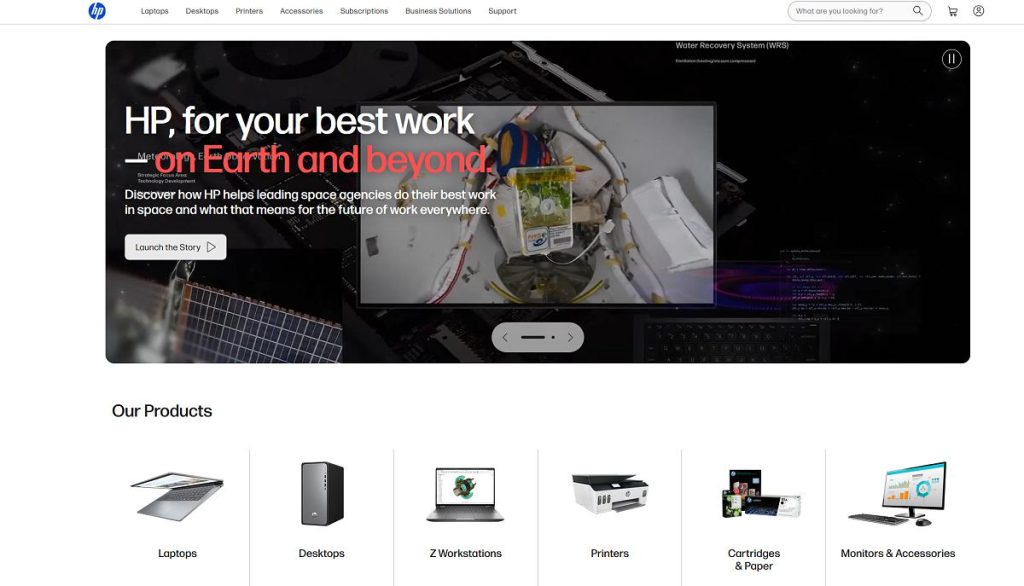
HP is a global technology brand best known for personal computers, laptops, desktops, printers, monitors, accessories, and solutions designed for home, education, and business users. Its portfolio covers a wide range of products, from affordable everyday laptops to premium computers, gaming systems, professional workstations, and advanced printing solutions.
The company has a long history in the technology industry. Founded in 1939 by Bill Hewlett and Dave Packard, the original business grew from a small Palo Alto operation into a major technology company and played an important role in the development of Silicon Valley. :contentReference[oaicite:3]{index=3}
Today, HP Inc. focuses primarily on personal systems, printing, and related technology. Its product portfolio is designed to serve individual consumers, students, professionals, small businesses, and larger organizations. :contentReference[oaicite:4]{index=4}
The range includes several distinct product families, making it possible to choose a device according to budget and intended use. Everyday users may prefer an affordable notebook, while professionals can choose business-oriented systems and creators can look for higher-performance hardware.
The company is also an important name in printing. Its printers and related supplies are used in homes, offices, schools, and businesses, with products ranging from basic home printers to multifunction and professional printing systems.
This guide explores the major product categories, laptop families, desktops, gaming systems, printers, monitors, accessories, business products, and the factors worth considering before choosing the right device.
Explore HP Products
Discover laptops, desktops, printers, monitors, gaming systems, accessories, and technology for home and business.
Explore ProductsTable of Contents
- What Is HP?
- HP Product Categories
- HP Laptops
- Consumer Laptop Families
- Business Computers
- Gaming PCs and OMEN
- Desktop Computers
- HP Printers
- HP Monitors
- Accessories
- Who Are HP Products Best For?
- Frequently Asked Questions
Quick Facts
| Fact | Details |
|---|---|
| Founded | 1939 |
| Founders | Bill Hewlett and Dave Packard |
| Headquarters | Palo Alto, California, United States |
| Industry | Personal computing, printing, technology and digital solutions |
| Known For | Laptops, desktops, printers, monitors and business technology |
| Consumer Computers | Laptops, desktops and all-in-one computers |
| Business Computers | Business laptops, desktops, workstations and related systems |
| Gaming | OMEN and Victus gaming PCs, laptops and accessories |
| Printing | Home, office, business and professional printing solutions |
| Displays | Monitors for home, office, gaming and professional use |
| Other Technology | Accessories, collaboration products, 3D printing and related solutions |
What Is HP?
HP is a technology company with a history that goes back to 1939, when Bill Hewlett and Dave Packard established their business in Palo Alto. The company’s early products included electronic test and measurement equipment, and its growth eventually expanded into computing, printing, and many other areas of technology. :contentReference[oaicite:5]{index=5}
The modern HP Inc. is focused on personal systems and printing rather than the enterprise infrastructure business that was separated into Hewlett Packard Enterprise in 2015. This distinction is important when researching the brand because HP Inc. and HPE are now separate companies serving different markets. :contentReference[oaicite:6]{index=6}
For consumers, the most visible part of the portfolio is personal computing. The range includes laptops and desktops for everyday users, students, professionals, creators, and gamers.
The company also has a major printing business. Home users can choose compact printers for documents and occasional photographs, while businesses can use multifunction systems designed for higher-volume printing, scanning, copying, and workflow management.
Monitors and accessories complement the main hardware portfolio. This makes it possible to create a complete workstation using a computer, display, printer, keyboard, mouse, docking station, and other peripherals.
The broad portfolio is one of the main reasons the brand remains relevant to such a wide range of users. A student buying a first laptop and a business equipping hundreds of employees may both find suitable products, although their requirements and budgets will be very different.
HP Product Categories
The product portfolio can be divided into several major categories. Understanding these categories makes it easier to identify which part of the lineup is relevant to your needs.
| Category | Typical Products | Best For |
|---|---|---|
| Laptops | Consumer, business, premium and gaming notebooks | Work, education, browsing, entertainment and mobility |
| Desktops | Tower PCs, all-in-one systems and business desktops | Home, office and professional computing |
| Gaming | OMEN and Victus PCs, laptops and accessories | Gaming and demanding applications |
| Printers | Inkjet, laser and multifunction printers | Home, education and business printing |
| Monitors | Office, gaming and professional displays | Productivity, entertainment and creative work |
| Accessories | Keyboards, mice, docks, webcams and other peripherals | Workstations and everyday computing |
| Professional Solutions | Workstations, business systems and specialized technology | Professional and organizational workloads |
HP Laptops
Laptops are one of the most important parts of the product range. Different families are designed for different types of users, so choosing the right model requires more than simply comparing processor specifications.
A student may prioritize price, portability, battery life, and a comfortable keyboard. A business user may place greater importance on security, durability, connectivity, and manageability. A creator may need a high-quality display and stronger processing performance, while a gamer may prioritize graphics performance and cooling.
Everyday Laptop Use
An everyday laptop can handle common activities such as web browsing, email, office applications, video streaming, online classes, communication, and document creation.
Users who mainly perform these tasks do not necessarily need the most powerful configuration. A balanced system with sufficient memory, fast storage, a good display, and reasonable battery life can provide a better overall experience than an expensive model with performance that will rarely be used.
Laptops for Students
Students typically need a combination of portability, battery life, comfortable typing, reliable wireless connectivity, and enough performance for documents, research, presentations, video calls, and online learning.
Screen size is also worth considering. A compact notebook is easier to carry between classes, while a larger display can make multitasking and document work more comfortable.
Students should also check the software requirements of their school or university. Some specialist applications may require specific hardware or operating system features.
Laptops for Professionals
Professional users often have more demanding requirements. Business notebooks may need stronger security, better durability, docking support, multiple display connectivity, and features designed for workplace deployment.
For office productivity, processor performance is only one part of the equation. A comfortable keyboard, high-quality display, webcam, microphone, battery life, and connectivity can have a much greater effect on everyday productivity.
Laptops for Creators
Content creators, photographers, designers, and video editors should pay particular attention to display quality, processor performance, graphics capabilities, memory, and storage.
Large creative projects can quickly consume storage space, especially when working with high-resolution photographs and video. A laptop intended for creative work should therefore be configured with enough storage for the expected workload or paired with suitable external storage.
Find Your Next Laptop
Compare laptops for students, professionals, home users, creators, and everyday computing.
Shop LaptopsConsumer Laptop Families
The consumer lineup includes several families aimed at different price levels and priorities. Instead of choosing purely by brand name, shoppers should compare the specifications and features of the individual model.
HP Pavilion
Pavilion laptops have traditionally been positioned toward mainstream users looking for a balance between price, performance, portability, and everyday functionality.
They can be suitable for students, families, home users, and people who need a general-purpose notebook for browsing, office applications, streaming, and communication.
HP Envy
Envy products are positioned higher in the consumer range and generally emphasize design, materials, display quality, and performance.
They can be attractive to users who want a more premium laptop without necessarily moving into a specialized workstation or gaming machine.
HP Spectre
Spectre has traditionally represented the premium end of the consumer notebook range, emphasizing slim designs, high-quality displays, premium materials, and advanced features.
Premium ultraportables can be particularly attractive to professionals and frequent travelers who value portability and design alongside performance.
When comparing premium laptops, it is important to consider the complete configuration rather than the product family alone. Memory, storage, display resolution, processor generation, battery capacity, and connectivity can vary significantly between individual models.
Explore Premium Laptops
Discover stylish laptops designed for productivity, mobility, entertainment, and demanding everyday use.
View LaptopsBusiness Computers
Business computing has different priorities from consumer hardware. Companies often need computers that can be deployed consistently across employees and managed over several years.
Security, durability, warranty support, docking compatibility, connectivity, and device management can therefore be more important than cosmetic design or entertainment features.
EliteBook
EliteBook is associated with business-oriented notebooks designed for professional environments. Depending on the model, features can include enhanced security, business-focused connectivity, premium construction, and technologies intended for workplace productivity.
These systems can be suitable for employees who travel frequently, work with sensitive information, or need a reliable business notebook for daily use.
ProBook
ProBook products have traditionally targeted businesses and professionals looking for practical systems without necessarily moving into the premium business segment.
They can provide a balance between price, productivity, manageability, and business-oriented features.
Workstations
Professional workstations are designed for workloads that require more processing power and specialized hardware than a typical office computer.
Users working with engineering applications, 3D design, advanced content creation, scientific workloads, or other demanding professional software should consider workstation-class hardware when their applications can benefit from it.
Explore Business Computers
Find professional laptops, desktops, workstations, and accessories designed for business environments.
View Business PCsGaming PCs and OMEN
Gaming is another important part of the portfolio. OMEN and Victus products provide gaming laptops, desktops, and related equipment designed for users who want higher graphics performance and gaming-oriented features.
OMEN
OMEN is positioned toward gaming enthusiasts and users looking for higher-performance gaming hardware. Depending on the configuration, systems can include dedicated graphics, high-refresh-rate displays, advanced cooling, and hardware designed for demanding games.
Gaming laptops require careful consideration of both performance and thermal management. A powerful processor and graphics card are useful only if the system can sustain performance during extended gaming sessions.
Victus
Victus is aimed at a broader gaming audience and can provide a more accessible entry point into gaming hardware.
It can be a practical choice for users who want a gaming-capable computer without necessarily paying for the highest-end specifications.
Upgrade Your Gaming Setup
Explore gaming laptops and desktops built for modern games, high-performance graphics, and entertainment.
Explore Gaming PCsGaming Laptop vs Desktop
A gaming laptop provides portability, while a desktop generally offers greater upgrade flexibility and can provide more performance for the same budget.
| Feature | Gaming Laptop | Gaming Desktop |
|---|---|---|
| Portability | Excellent | Limited |
| Upgradeability | Limited | Generally better |
| Desk Space | Minimal | Requires more space |
| External Monitor | Optional | Usually required |
| Performance per Dollar | Good | Often better |
| Gaming at Home | Very Good | Excellent |
The right choice depends on whether portability is important. Someone who moves between home and school or work may benefit from a gaming laptop, while a user with a permanent desk may get more value from a desktop.
HP Desktop Computers
Desktop computers remain a practical choice for users who want more performance, a larger workspace, easier upgrades, or a permanent computer setup. The range includes compact business systems, traditional towers, all-in-one computers, gaming desktops, and professional workstations.
Unlike laptops, desktop computers are not designed primarily around portability. Instead, they can provide more room for powerful processors, dedicated graphics cards, additional storage, and larger cooling systems.
Desktop PCs for Home
A home desktop can be a good choice for browsing, office applications, entertainment, education, photo management, and everyday computing.
Users who already have a suitable monitor, keyboard, and mouse can sometimes get better value from a desktop than from an all-in-one or laptop, particularly when portability is not important.
Business Desktop Computers
Business desktop systems are designed for offices and professional environments where reliability, security, manageability, and long-term deployment are important.
Current business offerings include EliteDesk and ProDesk systems, with different form factors available for various workspace requirements. HP also offers compact systems and workstation-class computers for more demanding workloads. :contentReference[oaicite:1]{index=1}
A compact desktop can be particularly useful in an office where desk space is limited. Larger tower systems provide more room for components and expansion.
All-in-One Computers
An all-in-one computer combines the display and main computer hardware into a single unit. This can make the desk look cleaner and reduce the number of cables required.
All-in-one systems can be attractive for home offices, reception areas, family rooms, and other environments where simplicity and appearance are important.
The main limitation is upgrade flexibility. Users who expect to replace components frequently may be better served by a traditional desktop tower.
Gaming PCs and OMEN
Gaming is an important part of the current computer portfolio. OMEN and Victus systems are designed for users who want more graphics performance than a typical office PC can provide.
OMEN Gaming Computers
OMEN is positioned toward gamers who want higher-performance hardware and gaming-focused features.
Depending on the configuration, a gaming system can include a powerful processor, dedicated NVIDIA graphics, high-speed memory, fast SSD storage, advanced cooling, and a high-refresh-rate display on laptop models.
The graphics card is usually the most important component for demanding modern games. However, processor performance, memory capacity, storage speed, cooling, and display characteristics also affect the overall experience.
Victus Gaming
Victus provides a more accessible route into gaming hardware. It is aimed at users who want a capable gaming computer without necessarily choosing the highest-end configuration.
A mid-range gaming PC can be an excellent option for users who mainly play popular esports titles, older games, or modern games at sensible settings.
Gaming Laptop or Gaming Desktop?
The choice between a gaming laptop and desktop depends mainly on portability.
| Priority | Gaming Laptop | Gaming Desktop |
|---|---|---|
| Portability | Excellent | Limited |
| Performance | Very Good to Excellent | Excellent |
| Upgrades | Limited | Generally easier |
| Desk Space | Minimal | More space required |
| External Display | Optional | Usually required |
| Long Gaming Sessions | Good with suitable cooling | Excellent |
A gaming laptop is the more flexible option for people who travel or move between locations. A desktop is usually more attractive for someone with a permanent gaming desk and no need for portability.
Upgrade Your Gaming Setup
Explore gaming laptops and desktops designed for modern games, entertainment, and demanding applications.Explore Gaming PCs
HP Z Workstations
Workstations are designed for professional workloads that can benefit from significantly more processing power, memory, graphics performance, or specialized hardware than a standard office PC.
ZBook mobile workstations are designed for professionals who need workstation-class capabilities while traveling. Current business offerings position ZBook systems toward creative and technical professionals working with demanding applications. :contentReference[oaicite:2]{index=2}
Who Needs a Workstation?
Workstations can be useful for engineers, architects, 3D artists, designers, video professionals, developers, scientists, and other users running demanding software.
For ordinary office work, however, workstation-class hardware is usually unnecessary. A conventional business laptop or desktop can provide more than enough performance for documents, email, browsers, spreadsheets, and video meetings.
Mobile Workstations
A mobile workstation combines the portability of a laptop with hardware aimed at professional workloads.
These systems can be useful for professionals who need to work with CAD, 3D applications, engineering software, video production, or other demanding applications away from a permanent workstation.
Because powerful hardware consumes more energy, buyers should also consider battery life, weight, thermal performance, and power requirements.
Explore Professional Workstations
Find powerful systems for engineering, design, 3D applications, content creation, and demanding professional workloads.
View WorkstationsHP Printers
Printing is another major part of the company’s technology portfolio. Printers are available for homes, students, small offices, larger organizations, and professional environments.
The right printer depends heavily on how often you print, what you print, whether you need scanning and copying, and how important running costs are.
Inkjet Printers
Inkjet printers can be useful for homes, students, and users who print a combination of documents and images.
They can provide good color reproduction and are often versatile enough for occasional photographs as well as everyday documents.
Before purchasing an inkjet printer, compare the cost of replacement ink and the expected number of pages you print each month.
Laser Printers
Laser printers are often a strong choice for users who print large quantities of documents. They can provide fast text printing and are particularly suitable for offices and users with regular printing workloads.
Monochrome laser printers can be economical for text-heavy workloads, while color laser models provide additional flexibility for businesses that need professional-looking color documents.
All-in-One Printers
Multifunction printers combine printing with scanning and copying. They can save desk space and eliminate the need for separate devices.
An all-in-one model can be particularly useful for home offices, students, and small businesses that occasionally need to scan documents or make copies.
Smart Printing
Modern printers can provide wireless connectivity, mobile printing, cloud-based features, and application integration. These functions can make printing from smartphones and laptops considerably easier.
However, connectivity features should be considered secondary to print quality, speed, reliability, and running costs.
Ink Costs and Total Ownership
The purchase price of a printer does not tell the complete story. Ink or toner can become a significant expense over several years.
Users who print frequently should therefore compare estimated running costs rather than choosing a printer based solely on its initial price.
Find the Right Printer
Explore printers for home, school, home offices, small businesses, and everyday document printing.
Shop PrintersHP Monitors
Monitors can significantly improve a computer setup by providing more screen space, better ergonomics, and features designed for particular workloads.
Office Monitors
Office monitors generally prioritize comfortable viewing, productivity, connectivity, and adjustability.
A larger display can make multitasking easier by allowing several applications to remain visible at the same time. Adjustable height, tilt, and rotation can also help create a more comfortable desk setup.
Gaming Monitors
Gaming monitors place greater emphasis on refresh rate, response time, adaptive synchronization, and gaming-oriented features.
The right refresh rate depends on the games being played and the performance of the graphics card. Competitive gamers may benefit from very high refresh rates, while casual players may prefer higher resolution and image quality.
Professional Displays
Creative professionals should pay particular attention to resolution, color accuracy, panel technology, brightness, and connectivity.
Photographers, designers, and video editors may have significantly different requirements from office users, so a monitor should be chosen according to the software and type of content being produced.
Multi-Monitor Setups
Using two or more monitors can provide a significant productivity advantage. A second display can be used for email, reference material, communication applications, timelines, monitoring tools, or additional documents.
Before creating a multi-monitor setup, check the available ports on your computer and graphics hardware. USB-C, HDMI, DisplayPort, and docking solutions can all provide different connection options.
HP Accessories
A computer is only part of a complete workstation. Accessories can improve comfort, connectivity, communication, and productivity.
Keyboards and Mice
External keyboards and mice are particularly useful with desktop computers and laptops connected to an external monitor.
Users who work for many hours at a desk should prioritize comfort and ergonomics. A well-designed mouse and keyboard can have a greater impact on everyday comfort than many hardware upgrades.
Webcams and Headsets
Video meetings have made webcams and headsets important accessories for remote and hybrid workers.
A dedicated webcam can provide better positioning and image quality than a built-in laptop camera, while a headset can improve communication and reduce background noise.
Docking Stations
A docking station can turn a laptop into the center of a desktop workstation. Depending on the model, a dock can provide connections for monitors, USB devices, Ethernet, audio equipment, and other peripherals through a single connection to the computer.
This can be especially useful for hybrid workers who regularly switch between a mobile laptop setup and a permanent desk.
Current business accessories include docking stations, monitors, headsets, bags, and other equipment designed to complement professional computers. :contentReference[oaicite:3]{index=3}
Storage and Connectivity
External storage can provide additional space for documents, photographs, videos, and backups. USB hubs and other connectivity accessories can also be useful when a laptop has a limited number of physical ports.
When choosing an accessory, check compatibility with the exact computer model rather than assuming that every USB-C or USB-A device supports every feature.
Complete Your Computer Setup
Explore monitors, docks, keyboards, mice, headsets, webcams, bags, and other accessories for work and everyday computing.Explore Accessories
Choosing Between HP Laptop Families
The large selection of laptop families can make choosing a model difficult. The best approach is to begin with your intended use and then narrow the selection based on budget and hardware requirements.
| Family / Type | Typical User | Main Priorities |
|---|---|---|
| Essential | Basic everyday users | Price and essential computing |
| Pavilion | Home users and students | Balance of price and performance |
| Envy | Premium everyday users | Design, display and performance |
| Spectre | Premium mobile users | Portability, design and advanced features |
| ProBook | Businesses and professionals | Productivity, security and manageability |
| EliteBook | Professional and business users | Security, mobility and premium business features |
| OMEN | Gaming enthusiasts | Performance, graphics and gaming features |
| Victus | Value-focused gamers | Gaming performance and affordability |
| ZBook | Technical and creative professionals | Workstation-class performance |
The current HP store also shows newer OmniBook families alongside established ranges such as EliteBook, ProBook, OMEN, Victus and ZBook. This means shoppers should check the current model lineup rather than relying exclusively on older family names. :contentReference[oaicite:4]{index=4}
How Much RAM Do You Need?
Memory requirements depend on the applications and number of programs you use simultaneously.
For basic browsing, documents, email, and streaming, a modest memory configuration can be sufficient. Users who regularly multitask, edit photographs, work with large spreadsheets, or use professional applications should consider more memory.
Gaming systems can also benefit from additional RAM, particularly when modern games are used alongside communication applications, browsers, and other software.
Professional users should consider the requirements of their specific applications rather than selecting memory solely based on a general recommendation.
SSD Storage vs External Storage
Modern computers generally benefit from SSD storage because it provides fast application loading and system responsiveness.
However, storage capacity can become a problem when working with large video files, photographs, games, or professional projects.
An external SSD can provide additional capacity while keeping large files separate from the main system drive. It can also be useful for backups and moving projects between computers.
AI PCs and Modern Computing
Artificial intelligence is becoming an increasingly important part of modern personal computers. Newer systems can include dedicated hardware designed to accelerate AI workloads, including neural processing units and other specialized components.
For everyday users, AI capabilities can support tasks such as image enhancement, video effects, productivity features, transcription, and other software functions. The practical benefits depend on the applications being used and whether they take advantage of the available hardware.
What Is an AI PC?
An AI PC is a computer designed with hardware that can accelerate certain artificial intelligence workloads locally. Instead of sending every task to a remote server, compatible applications can use the computer’s own processing resources for selected functions.
This can potentially improve responsiveness and reduce dependence on cloud processing for supported workloads. However, not every application benefits from an NPU or other AI hardware, so buyers should focus on the software they actually intend to use.
Who Should Consider an AI PC?
AI-capable computers can be particularly interesting to professionals who use applications with local AI features, creators working with image and video tools, and users who want newer hardware with longer-term software support.
For basic web browsing, email, documents, and streaming, AI hardware is less important than processor performance, memory, storage, display quality, and battery life.
Windows Computers for Everyday Use
Windows remains the primary operating system associated with the company’s personal computer portfolio. It provides access to a large selection of productivity applications, creative tools, games, utilities, and professional software.
Before buying a computer, consider which applications you need rather than choosing hardware based only on specifications. A computer designed for office work has very different requirements from one intended for 3D rendering or gaming.
Office Applications
For documents, spreadsheets, presentations, email, web applications, and video meetings, a balanced configuration is usually more valuable than maximum performance.
Users should prioritize a comfortable keyboard, good display, sufficient memory, fast SSD storage, reliable wireless connectivity, and battery life when choosing a laptop for office work.
Creative Applications
Photo and video editing can place significantly higher demands on a computer. Creators should consider processor performance, graphics capabilities, memory, storage speed, and display quality.
Video editors working with high-resolution footage may also need substantial storage capacity because raw and exported video files can consume hundreds of gigabytes.
Programming
Developers can benefit from additional memory and fast storage when running integrated development environments, virtual machines, containers, databases, browsers, and other development tools simultaneously.
Screen size can also make a significant difference. A larger display or multiple-monitor setup can provide more room for source code, documentation, terminals, and testing environments.
Security Features
Security is particularly important for computers used for work, banking, business applications, and sensitive information.
Business-oriented systems can include additional security technologies designed to protect devices, user credentials, data, and the operating environment.
Regardless of the computer selected, users should keep the operating system and applications updated, use strong passwords, enable available authentication features, and maintain reliable backups of important data.
Business Security
Organizations may require additional protection and management capabilities. Business computers can be deployed with security policies, authentication systems, device management tools, and other technologies that are less important to a typical home user.
For companies purchasing computers in larger quantities, security and manageability should therefore be considered alongside processor performance and price.
HP vs Other Computer Brands
HP competes with several major computer manufacturers, including Dell, Lenovo, ASUS, Acer, Apple, and others. Each brand has different strengths and product families.
| Brand | Strongest Areas | Typical Audience |
|---|---|---|
| HP | Laptops, business PCs, printers, gaming and workstations | Home, education, business and professional users |
| Dell | Business computers, laptops, desktops and workstations | Consumers and business users |
| Lenovo | Business laptops, consumer PCs and productivity devices | Home and professional users |
| ASUS | Gaming, laptops, displays and components | Gamers, creators and general users |
| Acer | Value-oriented laptops, gaming and displays | Students, home users and gamers |
| Apple | Premium computers, tablets and creative workflows | Consumers and creative professionals |
The best choice depends on the specific model rather than the logo on the computer. A well-configured mid-range laptop from one manufacturer can be a better purchase than a more expensive model from another brand with weaker specifications for your particular workload.
HP Laptop vs Desktop
The decision between a laptop and desktop should primarily depend on portability and workspace requirements.
| Priority | Laptop | Desktop |
|---|---|---|
| Portability | Excellent | Limited |
| Desk Space | Minimal | More space required |
| Upgrades | Limited | Generally easier |
| Large Display | Optional external monitor | External monitor normally required |
| Battery | Built in | Not applicable |
| Long-Term Expansion | More limited | Generally better |
A laptop is the obvious choice for people who travel, study in different locations, or work away from a permanent desk. A desktop is often more suitable for users who want a fixed workstation and expect to upgrade components over time.
How Much Should You Spend on a Laptop?
There is no universal ideal laptop budget. The right amount depends on what you need the computer to do.
Basic users can focus on getting enough memory, fast SSD storage, a good display, and acceptable battery life rather than paying for premium processors or dedicated graphics.
Students and office workers often benefit from spending more on build quality, keyboard comfort, display quality, and battery life instead of buying unnecessary performance.
Gamers and creators may need to allocate more of their budget toward the processor and graphics system because demanding software can make much greater use of these components.
It is also worth considering how long you expect to keep the computer. Spending slightly more on memory, storage, display quality, and build quality can make sense if the device is expected to remain in use for several years.
Explore HP Products
Discover laptops, desktops, printers, monitors, gaming systems, accessories, and technology for home and business.
Explore ProductsChoosing a Computer for Students
A student computer should balance portability, performance, battery life, durability, and price.
A lightweight laptop can be particularly useful for students who carry the device between classes, libraries, and home. A larger display can be more comfortable for multitasking, but it also increases weight and size.
Students should consider whether they need specialist software for engineering, architecture, programming, design, or other subjects. These applications can significantly change the required hardware configuration.
For general education, documents, research, presentations, online meetings, and entertainment, an efficient mainstream notebook can often provide more than enough performance.
Choosing a Computer for Business
Business users should consider reliability and manageability alongside performance.
A professional laptop may be used for many hours every day, transported between offices, connected to docking stations, and used with multiple external displays. These factors make connectivity, durability, security, and ergonomics particularly important.
For organizations, standardizing computer models can also simplify deployment, maintenance, support, and replacement.
Desktop systems can make sense for employees who work permanently from one location, while laptops provide greater flexibility for hybrid and mobile workers.
Choosing a Computer for Gaming
Gaming computers require a different balance of hardware. The graphics processor is generally the most important component for demanding modern games, while the processor, memory, storage, cooling, and display also affect the experience.
Gamers should match the computer to the resolution and refresh rate they intend to use. A system designed for 1080p gaming has different requirements from one intended for high-refresh-rate 1440p or 4K gaming.
Cooling is especially important in gaming laptops. Compact hardware has less room for heat dissipation, so sustained performance can differ between systems with similar specifications.
Choosing a Printer
Printer selection should begin with your printing habits rather than the purchase price.
| Printing Need | Recommended Type |
|---|---|
| Occasional documents | Basic inkjet or compact printer |
| Documents and photos | Color inkjet |
| High-volume text | Laser printer |
| Home office | Multifunction printer |
| Small business | Business multifunction or laser system |
| Scanning and copying | All-in-one printer |
Running costs should always be included in the purchasing decision. A printer that is inexpensive to buy can become expensive if replacement cartridges or toner are costly.
Advantages and Considerations
| Advantages | Considerations |
|---|---|
| Very broad selection of computers | The large portfolio can make model selection complicated |
| Strong business and consumer offerings | Specifications vary significantly between individual models |
| Dedicated gaming families | Gaming models can become expensive at higher specifications |
| Wide range of printers | Ink and toner costs should be considered |
| Professional workstation options | Workstation hardware is unnecessary for many everyday users |
| Large selection of monitors and accessories | Compatibility should be checked before buying accessories |
| Products for education and business | Business features may not be useful to home users |
How Long Should an HP Laptop Last?
The useful life of a laptop depends on its construction, hardware, workload, maintenance, and software requirements.
A computer used primarily for browsing and documents can remain useful for many years, while demanding gaming and professional workloads can make hardware feel outdated sooner.
Memory and storage capacity are particularly important for long-term usability. A computer that has enough RAM and storage when purchased is more likely to remain comfortable to use as applications become more demanding.
Battery capacity can also decline over time. Users who primarily operate a laptop from a desk may be less affected by battery aging than people who regularly work away from power outlets.
Who Are HP Products Best For?
HP products are suitable for a broad range of users because the portfolio covers multiple price levels and use cases.
Students can choose portable laptops for research, education, communication, and entertainment. Home users can select notebooks, desktops, printers, and monitors for everyday computing.
Professionals can choose business laptops, desktops, workstations, monitors, docking stations, and video-conferencing accessories.
Gamers can look toward OMEN and Victus systems, while creators and technical professionals can consider higher-performance computers and workstation-class hardware.
Businesses can also benefit from the combination of computers, printers, accessories, and workplace technology available across the portfolio.
The breadth of the range is therefore one of its strongest characteristics. Rather than specializing in one narrow market, the company provides hardware for many different computing environments.
Find Technology for Your Needs
Explore computers, printers, displays, gaming systems, and accessories for home, school, work, and entertainment.
Explore OptionsFrequently Asked Questions
What is HP best known for?
HP is best known for laptops, desktops, printers, monitors, business computers, gaming systems, and computer accessories.
When was HP founded?
The original company was founded in 1939 by Bill Hewlett and Dave Packard in Palo Alto, California.
Is HP a good computer brand?
The company offers computers across many price levels and categories. The best choice depends on the specific model, hardware configuration, intended workload, and budget.
Does HP make gaming computers?
Yes. OMEN and Victus are the primary gaming families, offering gaming laptops and desktops with dedicated graphics and gaming-oriented features.
What is HP OMEN?
OMEN is a gaming-focused product family designed for users who want higher-performance computers and gaming features.
What is Victus?
Victus is a gaming family aimed at users who want capable gaming hardware at a more accessible price point than premium gaming systems.
Does HP make business laptops?
Yes. Business-oriented families include ProBook and EliteBook, while ZBook systems are aimed at professional workstation workloads.
What is EliteBook?
EliteBook is a business-oriented laptop family designed around professional productivity, security, mobility, and workplace requirements.
What is ProBook?
ProBook is a business laptop family focused on practical professional computing, productivity, security, and value.
What is ZBook?
ZBook is a workstation-oriented family designed for demanding professional applications such as engineering, design, 3D work, and content creation.
Does HP make desktop computers?
Yes. The range includes consumer desktops, business desktops, compact systems, all-in-one computers, gaming PCs, and professional workstations.
Does HP make all-in-one computers?
Yes. All-in-one systems combine the display and computer hardware into a single unit, reducing cable clutter and simplifying the desktop setup.
Does HP make monitors?
Yes. The monitor range includes displays for office work, home computing, gaming, entertainment, and professional applications.
Does HP make gaming monitors?
Yes. Gaming displays can include features such as high refresh rates, fast response times, adaptive synchronization, and gaming-oriented connectivity.
Does HP make printers?
Yes. Printing is one of the company’s major product categories, with inkjet, laser, multifunction, home, office, and business-oriented printers.
Is an HP inkjet printer good for photos?
Suitable color inkjet models can be a good option for users who print photographs and documents. Print quality varies between individual models, so specifications should be compared before purchase.
Is a laser printer better than an inkjet?
Neither technology is universally better. Laser printers can be particularly suitable for high-volume document printing, while inkjet models can be attractive for mixed document and photo printing.
Are HP laptops good for students?
Yes. The portfolio includes lightweight and mainstream laptops suitable for research, documents, online classes, communication, and entertainment.
Are HP laptops good for business?
Yes. Business-oriented models provide features designed for professional productivity, security, connectivity, and workplace deployment.
Are HP laptops good for gaming?
Gaming families such as OMEN and Victus provide systems designed specifically for gaming. The appropriate model depends on the desired resolution, games, and performance requirements.
How much RAM should an HP laptop have?
The appropriate amount depends on the workload. Basic users need less memory than gamers, creators, developers, and professionals running demanding applications or extensive multitasking.
How much storage should a laptop have?
Storage requirements depend on the applications and files you keep locally. Users working with games, photographs, and video should consider significantly more capacity than someone primarily using cloud services and web applications.
Is HP better than Dell?
Neither brand is universally better. Compare individual models based on processor, memory, storage, display, battery, build quality, features, warranty, and price.
Is HP better than Lenovo?
Both offer extensive consumer and business portfolios. The better choice depends on the specific computer and your requirements rather than the brand alone.
Is HP good for office work?
Yes. The portfolio includes laptops, desktops, monitors, docking stations, keyboards, mice, webcams, headsets, and printers suitable for office environments.
Does HP make accessories?
Yes. Accessories include keyboards, mice, docking stations, webcams, headsets, bags, monitors, and other products designed to complement computers.
What should I consider before buying an HP laptop?
Consider processor performance, memory, SSD capacity, display quality, battery life, weight, connectivity, keyboard comfort, graphics capabilities, and the software you intend to use.
Is HP Right for You?
HP is a strong option for shoppers who want a broad selection of computers, printers, displays, gaming systems, and accessories from one established technology brand.
The main advantage is choice. You can select an affordable laptop for everyday tasks, a business notebook for professional work, a gaming system for demanding titles, or a workstation for specialized applications.
The printing portfolio also makes the brand particularly relevant to home offices, students, and businesses that need both computing and document solutions.
However, the large number of product families means that shoppers should compare individual configurations carefully. Two computers from the same brand can have very different processors, displays, memory, storage, graphics capabilities, and connectivity.
The best approach is therefore to begin with your workload and budget, then select the product family that matches those requirements.
Whether you need a laptop for school, a desktop for home, a business workstation, a gaming PC, a monitor, or a printer, the broad portfolio provides plenty of options to consider.
Ready to Find Your Next Computer?
Explore laptops, desktops, gaming systems, printers, monitors, accessories, and technology for home and business.
Explore HP Products