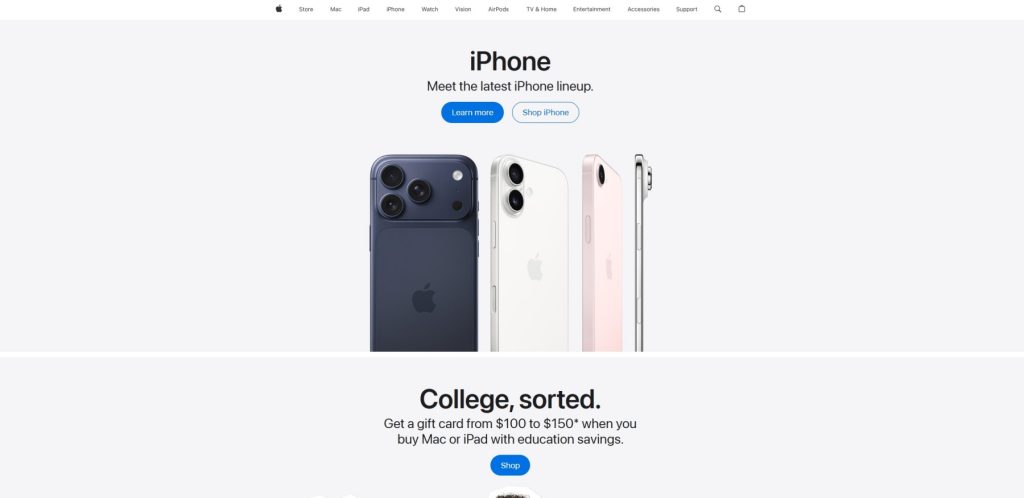
Apple is one of the world’s best-known technology brands, offering a broad ecosystem of smartphones, computers, tablets, wearables, wireless audio products, accessories, software, and digital services. Its product range includes iPhone, Mac, iPad, Apple Watch, AirPods, Apple TV, and a wide selection of accessories.
One of the defining characteristics of the company is the way its hardware and software are designed to work together. Users can combine an iPhone with a Mac, iPad, Apple Watch, and AirPods and use features that make it easier to share files, messages, photos, passwords, and other information.
The company develops both the hardware and operating systems behind many of its products. This close integration gives users a consistent experience across different devices and allows the brand to control many aspects of performance, security, software updates, and device interaction.
The range is designed for many different types of users. iPhone is aimed at smartphone users, Mac provides computers for everyday and professional workloads, while iPad offers a portable touchscreen platform for entertainment, education, productivity, and creative work.
Apple Watch adds wearable technology to the ecosystem, while AirPods provide wireless audio for music, calls, video, and everyday use. Apple also offers products for home entertainment, accessories, and services that extend the functionality of its hardware.
This guide explores the major product categories, their strengths and limitations, the ecosystem, and the factors worth considering before choosing a device.
Explore Apple Products
Discover iPhone, Mac, iPad, Apple Watch, AirPods, accessories, and other products from the Apple ecosystem.
Explore Apple ProductsDiscover iPhone, Mac, iPad, Apple Watch, AirPods, accessories, and other products from the Apple ecosystem.
Table of Contents
- What Is Apple?
- Apple Product Categories
- iPhone
- Mac Computers
- iPad
- Apple Watch
- AirPods
- The Apple Ecosystem
- Accessories
- Software and Services
- Who Are Apple Products Best For?
- Frequently Asked Questions
Quick Facts
| Fact | Details |
|---|---|
| Founded | 1976 |
| Headquarters | Cupertino, California, United States |
| Industry | Consumer electronics, software and digital services |
| Known For | iPhone, Mac, iPad, Apple Watch and AirPods |
| Smartphones | iPhone |
| Computers | MacBook, iMac, Mac mini, Mac Studio and Mac Pro |
| Tablets | iPad and iPad Pro |
| Wearables | Apple Watch and AirPods |
| Operating Systems | iOS, macOS, iPadOS, watchOS and other platforms |
| Website | Apple.com |
What Is Apple?
Apple is a technology company that develops consumer electronics, computers, operating systems, applications, and digital services. Its hardware portfolio is supported by platforms including iOS, macOS, iPadOS, watchOS, and other software designed for individual products.
Rather than treating every device as an independent product, the company places considerable emphasis on integration. This means that choosing one product can influence how other products fit into a user’s technology setup.
For example, an iPhone can work together with a Mac through features such as iCloud, AirDrop, Universal Clipboard, Messages, and other continuity features. An Apple Watch can interact with an iPhone, while AirPods can provide convenient audio access across compatible devices.
This approach is one of the main reasons consumers choose the brand. Instead of buying unrelated devices, users can create a connected collection of products that share information and services.
The ecosystem can be especially useful for people who use technology throughout the day. A photograph taken on a phone can become available on a computer, a document can be accessed from multiple devices, and notifications can appear on a wearable.
Apple Product Categories
The easiest way to understand the lineup is to divide it into several major categories. Each product has a different primary purpose, although many of them are designed to work together.
| Product | Best For | Main Strengths |
|---|---|---|
| iPhone | Smartphone users | Portability, cameras, performance and ecosystem integration |
| Mac | Students, professionals and creators | Productivity, performance and desktop software |
| iPad | Education, entertainment and creative work | Touchscreen flexibility and portability |
| Apple Watch | Wearable technology users | Fitness, notifications and communication |
| AirPods | Wireless audio users | Convenience, portability and integration |
| Apple TV | Home entertainment | Streaming, apps and connected entertainment |
| Accessories | Existing device owners | Charging, connectivity and expanded functionality |
iPhone
iPhone is one of the most important products in the ecosystem. It combines a smartphone, camera, communication platform, mobile computer, entertainment device, and access point to numerous services.
Different models are designed around different priorities, specifications, sizes, and price levels. When comparing them, shoppers should consider display size, camera capabilities, processor performance, battery life, storage capacity, connectivity, and the features they are most likely to use.
iPhone for Everyday Use
For everyday users, an iPhone can provide access to communication, web browsing, photography, navigation, streaming, social applications, banking, productivity tools, and entertainment.
The best model depends on individual requirements. Someone who primarily uses messaging, browsing, and social applications may not need the highest-performance configuration, while photographers, gamers, and power users may benefit from more advanced hardware.
Photography and Video
Camera performance is one of the major considerations when choosing a premium smartphone. The range includes models with sophisticated camera systems and computational photography features designed to improve photographs and video.
Storage is also important for users who frequently record video. High-quality photographs and video files can consume significant amounts of space, making larger storage configurations more practical for heavy users.
iPhone and Other Devices
The phone becomes particularly useful when combined with other products from the same ecosystem. Users can access photographs, messages, files, passwords, and other information across compatible devices.
This integration can save time and reduce the need to manually transfer information between devices.
Mac Computers
Mac is the company’s computer platform and includes both laptops and desktop systems. The range covers portable computers for students and professionals as well as desktop machines for users who need a permanent workstation.
MacBook Neo
MacBook Neo is positioned as an accessible laptop for everyday computing. It can appeal to students, home users, and people who primarily need a portable computer for browsing, documents, communication, streaming, and common productivity tasks.
MacBook Air
MacBook Air focuses on a balance between portability and performance. It can be a strong choice for students, professionals, home users, and creators who want a lightweight computer without moving into the more performance-focused Pro range.
The combination of a compact design, strong performance, long battery life, and a high-quality display makes this family suitable for many everyday and professional workloads.
MacBook Pro
MacBook Pro is aimed at users with more demanding workloads. It can be particularly useful for developers, designers, photographers, video editors, musicians, and other professionals who need additional processing and graphics performance.
The higher-end configurations are designed for sustained workloads where additional performance can save time. However, casual users should consider whether they would actually benefit from the extra capability before paying the premium.
Mac Desktop Computers
The desktop range includes iMac, Mac mini, Mac Studio, and Mac Pro. These products target different types of users and workloads.
iMac provides an all-in-one desktop experience, while Mac mini offers a compact computer that can be connected to an external monitor and peripherals.
Mac Studio and Mac Pro target demanding professional workflows where performance, connectivity, and expansion capabilities are particularly important.
Find the Right Mac
Find the Right Mac
Compare MacBook laptops and desktop computers for work, study, creative projects, and everyday computing.
Explore MaciPad
iPad sits between a smartphone and a traditional computer. Its touchscreen design makes it useful for browsing, entertainment, education, drawing, note-taking, reading, communication, and creative applications.
The range includes iPad Pro, iPad Air, the standard iPad, and iPad mini. Accessories such as Apple Pencil and keyboards can extend the functionality of the tablet and make it more suitable for productivity and creative work.
iPad Pro
iPad Pro is designed for users who want a premium tablet with high performance. It can be useful for demanding creative applications, drawing, photo editing, video work, multitasking, and professional workflows.
iPad Air
iPad Air provides a balance between performance, portability, and price. It can be a good option for students, professionals, and home users who want more capability than a basic tablet but do not necessarily need the highest-end configuration.
Standard iPad
The standard iPad is aimed at everyday users and can handle browsing, streaming, education, reading, communication, and general applications.
iPad mini
iPad mini focuses on compact size and portability. Its smaller form factor can make it particularly convenient for reading, travel, note-taking, and users who want a tablet that is easier to carry.
Apple Watch
Apple Watch extends the ecosystem into wearable technology. It combines notifications, communication, fitness features, apps, and other functions in a device designed to be worn throughout the day.
One of its main advantages is convenience. Instead of reaching for a smartphone every time a notification arrives, compatible alerts and interactions can be handled directly from the wrist.
Everyday Use
The watch can provide access to notifications, calls, messages, timers, calendars, music controls, navigation, and other everyday functions.
Users should consider battery life, display size, materials, connectivity, durability, and available features when comparing models.
Fitness and Outdoor Activities
Fitness tracking is another important part of the wearable experience. Compatible models can track activities such as walking, running, cycling, swimming, and other workouts.
People who exercise regularly should consider GPS capabilities, battery life, water resistance, comfort, durability, and the workout features they actually need.
Apple Watch Ultra
Apple Watch Ultra is designed for users who want a larger and more rugged wearable with additional capabilities for outdoor activities. Its design makes it particularly relevant to people who spend significant time outdoors.
For a typical everyday user, however, those additional features may not justify the higher price compared with a standard model.
AirPods and Wireless Audio
AirPods are wireless audio products designed to work closely with compatible devices. They can be used for music, podcasts, video, calls, online meetings, and everyday listening.
The range includes different models with different approaches to sound quality, noise control, fit, battery life, and features.
AirPods
Standard AirPods are designed around convenience and everyday use. Their compact charging case makes them easy to carry, while automatic pairing can simplify switching between compatible devices.
AirPods Pro
AirPods Pro provide a more advanced wireless earbud experience. Depending on the model, features can include active noise cancellation, transparency modes, advanced audio processing, and additional controls.
Noise cancellation can be particularly useful in environments with continuous background noise such as public transportation, offices, or airplanes.
AirPods Max
AirPods Max are over-ear wireless headphones designed for users who prefer a larger headphone format. They provide a different fit and listening experience from compact earbuds and can be attractive to people who spend long periods listening to music or watching video.
Discover Apple Devices
Explore iPhone, iPad, Apple Watch, AirPods, and other devices designed to work together.
Explore Apple ProductsThe Apple Ecosystem
The ecosystem is one of the main reasons consumers choose the brand. Hardware and software are designed to communicate with each other, making it possible to use several devices as part of one connected setup.
iCloud
iCloud provides cloud storage and synchronization for compatible devices. Depending on the services being used, it can synchronize photographs, files, contacts, calendars, passwords, notes, and other information.
This means that information saved on one device can become available on another without manually transferring it using cables or external storage.
Continuity
Continuity features are designed to make switching between compatible devices easier. Users can perform certain tasks on one device and continue them on another, depending on the application and feature involved.
This can be particularly useful for people who use a Mac and iPhone together. Tasks such as copying text, sharing files, receiving calls, and continuing compatible activities can become more seamless.
AirDrop
AirDrop provides a convenient way to share compatible files, photographs, links, and other content between nearby devices. It can be useful when transferring a small number of files without using cloud storage or physical media.
Apple Watch and iPhone
The wearable is closely connected to the iPhone ecosystem. The smartphone can be used to configure and manage the watch, while the wearable provides notifications, communication, fitness information, and other functions.
Accessories
Accessories can extend the functionality of the main devices. The range includes charging products, cables, cases, keyboards, mice, Apple Pencil, adapters, docks, and other equipment designed for compatible hardware.
Apple Pencil
Apple Pencil is designed for compatible iPad models and can be useful for handwriting, drawing, annotation, note-taking, and creative applications.
For students, designers, artists, and professionals working with visual content, a compatible stylus can transform a tablet into a more capable productivity and creative tool.
Mac Accessories
Mac computers can be paired with external displays, keyboards, mice, trackpads, storage devices, docks, and other accessories. This can be particularly useful when creating a permanent workstation.
A MacBook can also be connected to an external monitor and peripherals when working at a desk and then disconnected when portability is required.
Cases and Protection
Cases and protective accessories can help reduce the risk of scratches and everyday damage. This can be particularly useful for smartphones and tablets that are frequently carried outside the home.
Build Your Apple Ecosystem
Combine iPhone, Mac, iPad, Apple Watch, AirPods, and accessories to create a connected technology setup.
Explore Apple DevicesSoftware and Services
Hardware is only one part of the ecosystem. The company also provides software platforms and digital services that support its devices.
Examples include iCloud, Apple Music, Apple TV+, Apple Arcade, Apple Fitness+, Apple Pay, and the App Store. Availability and individual features can vary by country and device.
Apple Music
Apple Music is a subscription-based music service integrated with compatible devices. It provides access to a large music catalog, playlists, recommendations, and other audio content.
Apple TV+
Apple TV+ provides access to original television programs, movies, documentaries, and other video content. It can be accessed through compatible devices as well as supported third-party platforms.
Apple Arcade
Apple Arcade is a gaming subscription service offering access to a selection of games across compatible devices. It can be useful for users who enjoy mobile and casual gaming.
Apple Pay
Apple Pay allows compatible users to make payments using supported devices and participating payment cards. Availability depends on the country, bank, card, and merchant.
Privacy and Security
Privacy and security are important parts of the overall product experience. Security features are built into the hardware and operating systems, while account-level protections help safeguard personal information and access to devices.
Features such as biometric authentication, encryption, permissions management, account security, and software updates can help protect users and their information.
Good security practices are still important. Strong account credentials, two-factor authentication, regular updates, and careful management of application permissions should be used regardless of the device.
Build Your Apple Ecosystem
Combine iPhone, Mac, iPad, Apple Watch, AirPods, and accessories to create a connected technology setup.
Explore Apple DevicesChoosing Between iPhone, iPad and Mac
These products overlap in some areas, but they are designed for different roles.
| Device | Best For | Main Advantage |
|---|---|---|
| iPhone | Communication and mobile computing | Portability and broad everyday functionality |
| iPad | Entertainment, education and creative work | Touchscreen flexibility and portability |
| MacBook | Productivity and professional computing | Desktop-class software and multitasking |
| Mac Desktop | Permanent workstations | Performance, connectivity and larger setups |
If you primarily need communication, photography, navigation, and mobile applications, an iPhone may be enough. An iPad becomes more useful when a larger touchscreen is desirable, while a Mac is the better option for traditional desktop applications and advanced multitasking.
Many users ultimately choose more than one device because each serves a different role. The strength of the ecosystem is that these devices can then work together rather than functioning as isolated products.
Build Your Apple Ecosystem
Combine iPhone, Mac, iPad, Apple Watch, AirPods, and accessories to create a connected technology setup.Explore Devices
Who Are Apple Products Best For?
Apple products are designed for a wide range of users, from people who want a simple smartphone and wireless earbuds to professionals who need powerful computers for demanding creative and technical workloads.
The ecosystem can be particularly attractive to users who value convenience and integration. Once several compatible devices are connected to the same account, tasks such as sharing files, synchronizing photographs, accessing messages, and switching between devices can become easier.
Students can benefit from portable computers and tablets for studying, note-taking, research, communication, and entertainment. Professionals can choose between lightweight laptops, powerful notebooks, desktop systems, and tablets depending on their workloads.
Content creators may prioritize processing power, display quality, storage, memory, and compatibility with their preferred applications. Everyday users may instead value portability, battery life, ease of use, and overall convenience.
Advantages and Considerations
| Advantages | Considerations |
|---|---|
| Strong integration between hardware and software | Many products are positioned in the premium price segment |
| Wide selection of smartphones, computers and tablets | Some features work best when multiple compatible devices are used |
| Consistent software experience | Some hardware upgrades can be expensive |
| Strong selection of accessories and services | Compatibility with non-Apple platforms can vary |
| Powerful computers for professional workloads | Some Windows applications are not available natively on macOS |
| Convenient device synchronization | Higher storage configurations can increase the purchase price considerably |
How to Choose the Right Device
The best approach is to start with the tasks you actually need to perform rather than choosing the most expensive model.
If communication, photography, navigation, mobile applications, and entertainment are the main priorities, a smartphone is the natural starting point. If you want a larger touchscreen for reading, drawing, studying, or media consumption, a tablet may be more appropriate.
Users who need traditional desktop software, extensive multitasking, programming tools, professional applications, or advanced file management should consider a Mac.
Wearable technology is a separate decision. A smartwatch makes the most sense for users who want quick access to notifications, fitness tracking, communication, and other functions directly from the wrist.
Wireless earbuds are useful for people who want convenient audio without cables. Different models should be compared according to fit, noise cancellation, battery life, sound quality, and intended use.
MacBook Air vs MacBook Pro
MacBook Air and MacBook Pro are aimed at different levels of computing demand. The Air is generally the more sensible option for everyday productivity, education, browsing, office work, and many creative tasks.
The Pro range is designed for users who regularly perform demanding workloads and can benefit from additional processing and graphics performance.
| Use Case | MacBook Air | MacBook Pro |
|---|---|---|
| Web Browsing | Excellent | Excellent |
| Office Work | Excellent | Excellent |
| Education | Excellent | Very Good |
| Programming | Very Good | Excellent |
| Photo Editing | Very Good | Excellent |
| Video Editing | Very Good | Excellent |
| Professional Production | Good to Very Good | Excellent |
For many users, the MacBook Air provides enough performance and represents a better balance between price, portability, and capability. Professionals who frequently work with large projects may benefit more from the Pro range.
iPad vs MacBook
A tablet can replace a laptop for some users, but it is not the ideal replacement for everyone. The touchscreen interface, portability, and stylus support make it particularly useful for reading, drawing, note-taking, education, and media consumption.
A MacBook is more suitable when traditional desktop applications, extensive multitasking, programming environments, or professional software are important.
Keyboard accessories can make a tablet more suitable for productivity, but shoppers should consider the total cost of the tablet and accessories when comparing it with a laptop.
Smartphone Storage and Performance
Storage capacity is one of the most important specifications to consider when buying a smartphone. Applications, photographs, videos, games, and downloaded media can consume storage quickly.
Users who take large numbers of photographs or record a lot of video should consider a higher capacity. Someone who primarily uses cloud services and takes occasional photographs may not need as much local storage.
Performance is another consideration. Modern smartphone processors provide substantial computing power, but the practical difference between models depends on how the device is used.
Smartwatch or Traditional Watch?
A smartwatch provides functionality that a traditional watch cannot offer, including notifications, fitness tracking, communication, apps, timers, navigation, and interaction with compatible devices.
A traditional watch may be preferable for users who want simplicity, very long battery life, or a device that does not require regular charging.
Wireless Earbuds vs Over-Ear Headphones
Wireless earbuds and over-ear headphones serve somewhat different purposes. Earbuds are compact, easy to carry, and convenient for everyday use.
Over-ear headphones can provide a different listening experience and may be more comfortable for some users during extended sessions. The best option depends on portability, comfort, noise isolation, sound preferences, and intended use.
Buying Products as an Ecosystem
One of the most important decisions is whether you want to buy a single device or build a broader collection of connected products.
If you already own an iPhone, adding an Apple Watch or AirPods can provide additional convenience. Adding a Mac or iPad can extend the ecosystem further and make it easier to move information between devices.
However, buying multiple products solely for ecosystem integration is not always the most economical approach. Each device should provide a useful function that justifies its cost.
Apple for Students
Students can use a combination of iPhone, iPad, and Mac products for studying, communication, research, note-taking, document creation, and entertainment.
A MacBook Air can be a practical primary computer for many students because of its portability and performance. An iPad can complement it by providing a touchscreen for reading, handwritten notes, drawing, and presentations.
Students should check the software requirements of their course before choosing a Mac. Some specialist academic applications may require Windows or another operating system.
Apple for Professionals
Professionals can choose from lightweight laptops, more powerful MacBook Pro systems, desktop Macs, and iPad products depending on their workloads.
Creative professionals may prioritize display quality, processing power, graphics performance, memory, and storage. Developers may focus on processor performance, memory capacity, external displays, and software compatibility.
For office productivity, a less expensive Mac can often provide more than enough performance. Spending more on a high-end configuration only makes sense when the workload actually benefits from the additional hardware.
Frequently Asked Questions
What is Apple best known for?
The company is best known for iPhone, Mac, iPad, Apple Watch, AirPods, and its broader ecosystem of hardware, software, and digital services.
Are Apple products good for students?
Yes. MacBook and iPad products can be useful for studying, research, document creation, communication, note-taking, and creative projects. Students should check software compatibility for their specific courses.
Is MacBook good for work?
Yes. MacBook computers can handle office applications, web-based work, programming, creative software, communication, and many professional workloads.
What is the difference between MacBook Air and MacBook Pro?
MacBook Air focuses on portability, efficiency, and everyday performance, while MacBook Pro is designed for users who need higher sustained performance for demanding professional workloads.
Is iPad a replacement for a laptop?
For some users, yes. An iPad can handle browsing, documents, email, media, education, drawing, and many productivity tasks. Users who require traditional desktop applications or advanced multitasking may prefer a MacBook.
Which iPad is best for drawing?
iPad Pro and iPad Air can be particularly attractive for drawing and creative work when paired with a compatible Apple Pencil. The best choice depends on required performance, display, size, and budget.
Are AirPods good for everyday use?
Yes. AirPods are designed for portable wireless audio and can be used for music, podcasts, video, calls, and communication.
What is the difference between AirPods and AirPods Pro?
AirPods Pro provide additional features and a different in-ear design, including advanced noise-control capabilities on compatible models. Standard AirPods focus more on simplicity and everyday convenience.
Does the company make desktop computers?
Yes. The desktop lineup includes iMac, Mac mini, Mac Studio, and Mac Pro, with different products targeting different performance and workspace requirements.
Is iPhone good for photography?
iPhone models include advanced camera systems and computational photography features. Higher-end models generally provide additional camera capabilities for users who take photography and video more seriously.
Does Apple Watch work with Android phones?
Apple Watch is designed to work with Apple’s ecosystem and should be paired with a compatible iPhone. Android users should not assume that the same functionality will be available without an iPhone.
Does the company make gaming computers?
Mac computers can run games that support macOS, but they are not primarily positioned as dedicated gaming computers. Users who prioritize PC gaming should check whether their preferred games and services support macOS.
Is Mac good for video editing?
Yes. Mac computers can be well suited to video editing, particularly configurations with sufficient memory, storage, and processing performance for the intended workload.
Is Apple good for business?
Apple products can be suitable for many business environments, particularly productivity, creative work, software development, communication, and mobile work. Organizations should evaluate application compatibility and management requirements before standardizing hardware.
Does the company make monitors?
Yes. Apple offers professional display products such as Studio Display and Pro Display XDR. These are aimed primarily at users who need high-quality external displays for professional workflows.
Do Apple products work together?
Yes. Many Apple products are designed to work together through features such as iCloud, AirDrop, Continuity, and other ecosystem integrations.
Are Apple products expensive?
Many products are positioned in the mid-range to premium segments. The best value depends on the specific product, configuration, expected lifespan, software requirements, and how much the user benefits from ecosystem integration.
Is Apple Right for You?
Apple can be a strong choice for users who value integration between devices, a consistent software experience, and a broad ecosystem of computers, smartphones, tablets, wearables, audio products, and services.
The ecosystem is particularly attractive when multiple devices are used together. An iPhone can serve as the central mobile device, while a Mac provides desktop computing, an iPad adds touchscreen flexibility, Apple Watch provides wearable functionality, and AirPods provide convenient wireless audio.
However, not every user needs the entire ecosystem. Someone who only needs a smartphone may have no reason to purchase a Mac or smartwatch, while a professional may benefit substantially from combining several devices.
The best approach is to identify your actual requirements first and then choose the products that solve those requirements. This helps avoid paying for features that you are unlikely to use.
For users who want a tightly integrated collection of technology products and value the convenience of having hardware and software designed to work together, Apple remains one of the strongest ecosystems available.
Ready to Explore Apple?
Discover iPhone, Mac, iPad, Apple Watch, AirPods, accessories, and other products for your technology ecosystem.
Explore Apple Products