HostNOC Review – Dedicated Servers, VPS Hosting & Cloud Infrastructure

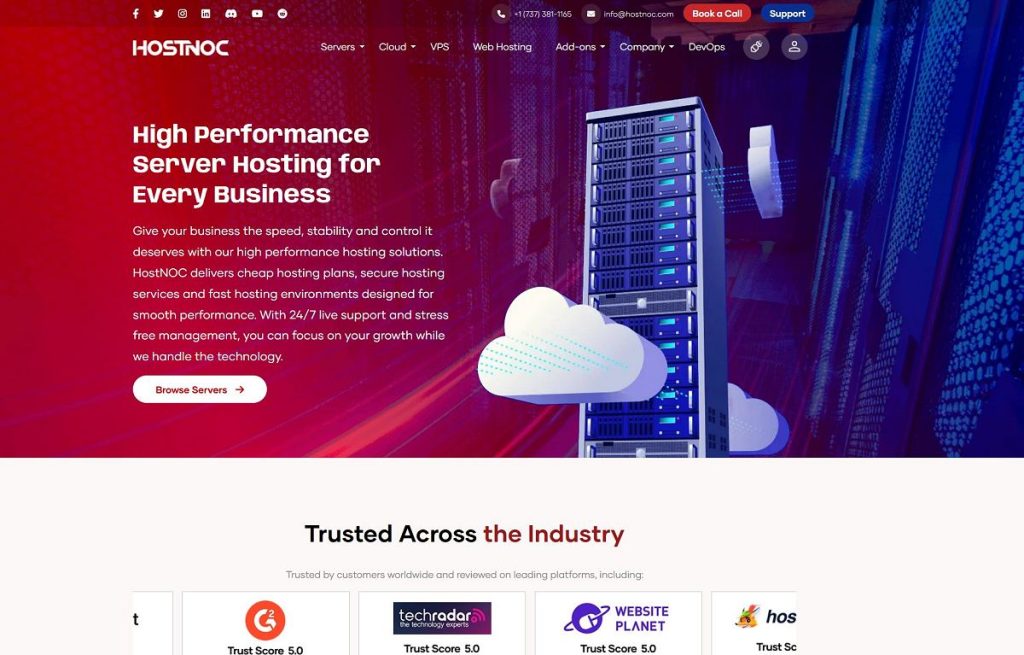
HostNOC dedicated servers, VPS hosting and cloud infrastructure services

HostNOC is a hosting and infrastructure provider offering dedicated servers, virtual private servers, managed cloud hosting, and related technology services. Its services are designed for website owners, developers, agencies, online businesses, and organizations that need more control over their hosting environment than traditional shared hosting can provide.

Choosing a hosting provider involves more than comparing monthly prices. Server hardware, storage, network capacity, data center location, technical support, security, and management responsibilities all influence the experience. A low-cost server may be suitable for a development project or a small website, while a busy online store or business application may require more powerful hardware, additional redundancy, and professional administration.

This HostNOC review explores its main hosting services, dedicated server options, VPS infrastructure, cloud hosting, performance considerations, security features, and support arrangements. It also explains which types of projects may benefit from HostNOC and what to check before ordering a server.

HostNOC’s published service information includes dedicated servers, VPS hosting, managed cloud hosting, and other infrastructure solutions. Actual hardware configurations, prices, deployment times, and included services can vary by location and plan. Review the current offer before purchasing.

Explore HostNOC Hosting Services

Compare available server configurations, hosting options, and infrastructure services for your project.

Explore HostNOC Plans →

Affiliate Disclosure: CatalogSpot may earn a commission from qualifying links at no extra cost to you. Prices and features may change, so check the provider’s website before purchasing.

Table of Contents

What Is HostNOC?

HostNOC is a hosting provider focused on server infrastructure and related services. Its portfolio includes dedicated servers, VPS hosting, managed cloud hosting, and additional solutions for customers with different technical requirements. The company also advertises support and infrastructure services intended to help customers deploy and maintain online projects.

Unlike basic shared hosting, where multiple customers use resources on the same hosting environment, dedicated and virtual server products provide greater control over how applications are configured and operated. The level of isolation, available resources, administrative access, and management support depends on the specific service.

HostNOC may be relevant to customers who need to run websites, online stores, databases, development environments, business applications, or other workloads that require a configurable server. Agencies and developers may also appreciate having access to different server configurations as their projects grow.

One important distinction is the difference between managed and unmanaged hosting. With an unmanaged server, the customer generally takes responsibility for operating system configuration, software installation, security updates, and routine administration. A managed service can transfer some of those responsibilities to the provider, depending on the agreement.

Before choosing HostNOC, establish how much server administration you can handle yourself. Hardware and network specifications matter, but so does the support available when something goes wrong. The right hosting solution should match both your technical requirements and the time you can dedicate to managing infrastructure.

HostNOC Hosting Services

HostNOC offers several types of hosting and infrastructure services. They address different workloads, budgets, and levels of technical responsibility. Understanding the differences can help you avoid paying for a server that is more powerful than necessary or choosing a configuration that cannot handle your workload.

ServiceBest suited forMain consideration
Dedicated serversResource-intensive websites, applications, databases, and business workloadsHardware selection, management, and total operating cost
VPS hostingGrowing websites, development projects, and smaller applicationsCPU, RAM, storage, virtualization, and resource limits
Managed cloud hostingCustomers who want infrastructure with additional management assistanceExact scope of management, scaling, backups, and support
WordPress hostingWordPress websites and content-driven projectsPerformance configuration, caching, backups, and maintenance
Gaming and application serversSpecific applications with their own CPU, memory, and network requirementsApplication compatibility and workload-specific performance

This comparison is intended as a guide to service categories rather than a statement that every configuration is available at all times. Check the current HostNOC catalog for the exact plans, specifications, and terms.

HostNOC Dedicated Server Hosting

A dedicated server is a physical server allocated to one customer. Unlike a typical shared hosting account, a dedicated server gives the customer much greater control over the machine’s resources and software environment. This makes dedicated hosting useful for workloads that require predictable capacity, custom configurations, or extensive administrative access.

HostNOC advertises dedicated server configurations in multiple locations and hardware categories. Depending on availability, customers may be able to choose different processors, memory capacities, storage arrangements, and network options. The exact configuration should be checked on the order page before committing to a plan.

Why choose a dedicated server?

  • Greater resource control: A dedicated physical machine provides a defined hardware environment for your workloads.
  • Custom configuration: Server hardware and software can be selected to match the application, subject to available options.
  • Administrative flexibility: Dedicated server plans commonly provide root or administrator access, depending on the service.
  • Workload isolation: You do not share the physical server’s main resources with unrelated customers in the same way as on shared hosting.
  • Application flexibility: Dedicated servers can be suitable for databases, business applications, high-traffic websites, and custom software.

Choosing the right server hardware

Processor performance is important when an application performs significant calculations or handles many simultaneous requests. Memory is equally important for database caching, application processes, and multiple services running at the same time. Storage capacity and storage speed affect file access, database operations, backups, and application responsiveness.

Do not choose a server based only on the number of CPU cores. Processor generation, per-core performance, memory bandwidth, storage technology, and the nature of the workload all affect real-world performance. A database-heavy application may have different requirements from a media-processing service or a website serving mostly cached pages.

Budget and performance server configurations

A budget dedicated server can be a practical choice for smaller applications, testing environments, and projects with moderate resource demands. A more powerful configuration may be appropriate for busy websites, larger databases, or applications that need additional memory and processing capacity.

The best value is not always the cheapest monthly price. Consider the complete specification, bandwidth terms, backup options, support arrangements, setup costs, and renewal conditions. If a server is responsible for generating business revenue, the cost of downtime or inadequate performance may outweigh a modest saving on the monthly fee.

When a dedicated server may be unnecessary

Not every website needs a physical server. A small blog, a new business website, or a low-traffic project may work well on managed WordPress hosting or a VPS. Dedicated hosting introduces additional responsibilities and can increase costs if the available resources are not used efficiently.

Choose a dedicated server when you have a clear reason for needing the hardware, isolation, or administrative control it provides.

HostNOC VPS Hosting

A virtual private server, or VPS, is a virtualized server environment hosted on a physical machine. It provides a defined allocation of resources and a more configurable environment than conventional shared hosting. VPS hosting can be a useful middle ground between a basic hosting account and a dedicated physical server.

HostNOC advertises VPS hosting for customers who need server-level control and scalable infrastructure. Available specifications, operating systems, storage options, and network terms should be verified for the plan you intend to purchase.

Advantages of VPS hosting

  • More control: A VPS typically allows greater control over the operating system and software than standard shared hosting.
  • Defined resources: Plans specify resource allocations, although performance also depends on the underlying platform and service terms.
  • Flexible applications: VPS environments can host websites, APIs, databases, development tools, and other compatible software.
  • Lower entry cost: A VPS can provide useful server capabilities without requiring a dedicated physical machine.
  • Room to grow: Depending on the provider’s options, customers may be able to upgrade resources as their requirements increase.

Who should use a VPS?

A VPS may be suitable for developers, freelancers, agencies, and website owners who have outgrown shared hosting. It can also be useful for staging websites, running test environments, hosting smaller applications, or separating projects that need different software configurations.

For WordPress users, a VPS may provide more control over PHP settings, database configuration, caching, and web server software. However, that flexibility also requires technical knowledge. An unmanaged VPS is not automatically easier to operate than shared hosting simply because it offers more resources.

VPS versus dedicated servers

The main distinction is that a VPS runs as a virtual environment on a physical host, while a dedicated server allocates the physical machine to one customer. A VPS usually has a lower starting cost and can be easier to scale in smaller increments. A dedicated server may provide more predictable access to the machine’s physical resources and greater freedom for certain workloads.

The correct choice depends on the application, required performance, budget, and administration skills. Start with a VPS if its resources are sufficient and there is no clear reason to pay for dedicated hardware. Consider a dedicated server when the workload, resource requirements, or isolation needs justify it.

HostNOC Managed Cloud Hosting

Cloud hosting uses a cloud infrastructure platform to provide computing resources for applications and services. Depending on the architecture, cloud environments can offer flexible resource allocation, management tools, and options for changing capacity as demand evolves.

HostNOC lists managed cloud hosting among its services. The precise meaning of managed hosting depends on the service agreement, so customers should verify which tasks the provider handles and which remain their responsibility.

What does managed hosting mean?

Managed hosting can include some combination of initial setup, operating system maintenance, security updates, monitoring, troubleshooting, and technical assistance. The scope varies significantly between providers and plans. A service described as managed does not necessarily include application development, website content updates, custom software support, or unlimited troubleshooting.

Before ordering managed cloud hosting, request a clear description of what is included. Ask whether server monitoring is proactive, how maintenance is scheduled, what backup services are available, and whether support covers your application or only the underlying infrastructure.

When cloud hosting makes sense

Cloud infrastructure may be appropriate for applications with changing resource needs, development environments, business software, or projects that require a more flexible hosting arrangement. It can also be useful when a customer wants infrastructure management support rather than handling every server task independently.

However, the word cloud does not automatically guarantee redundancy, automatic scaling, or high availability. Those capabilities depend on the architecture and configuration. Confirm whether the plan includes failover, replication, load balancing, backups, and defined recovery procedures if these features are important to your business.

Hosting Websites and Online Stores

HostNOC’s server and hosting services may be relevant to website owners who need more control over their infrastructure. The appropriate option depends on website complexity, traffic, application requirements, and how much maintenance the owner wants to perform.

WordPress websites

WordPress can run on several hosting types, from shared hosting to VPS and dedicated servers. A smaller site may perform well on a properly configured managed WordPress plan, while a larger installation with heavy database activity, multiple plugins, or substantial traffic may benefit from more resources and configuration flexibility.

Moving WordPress to a VPS or dedicated server does not automatically make the website faster. Performance also depends on the theme, plugins, database queries, image sizes, caching, PHP configuration, and external scripts. A well-optimized website on modest hosting can outperform a poorly optimized installation on expensive hardware.

WooCommerce and online stores

E-commerce websites need to handle product browsing, searches, customer accounts, shopping carts, and checkout operations. Database activity and dynamic requests can make them more demanding than static websites. Traffic spikes during promotions can also create temporary resource pressure.

For an online store, consider CPU capacity, memory, storage performance, backup frequency, security practices, and the ability to restore service after an incident. Payment processing should use secure, supported integrations, and the server should be maintained according to the application’s requirements.

Agencies and multiple websites

Agencies and developers managing several websites may benefit from server-level flexibility. A VPS or dedicated server can provide a common environment for multiple projects, subject to available resources and suitable isolation between applications.

However, hosting several customer websites on one server also concentrates risk. A configuration error, resource shortage, or security incident can affect multiple projects. Use appropriate account separation, access controls, backups, monitoring, and documented recovery procedures.

Static websites and lightweight projects

A simple static website may not need a VPS or dedicated server at all. Static hosting and content delivery networks can be cost-effective for sites that mainly serve HTML, CSS, JavaScript, and images. Compare the requirements of your project before committing to server infrastructure.

Server Performance and Hardware

Hosting performance depends on several interacting factors. CPU capacity, memory, storage, network quality, software configuration, and the location of the server can all influence how quickly an application responds.

CPU and memory

CPU resources matter when the application performs calculations, generates dynamic pages, processes requests, or runs background jobs. Memory is important for application processes, databases, caches, and services that operate concurrently. Insufficient RAM can lead to swapping or process failures, while an overloaded CPU can increase response times.

Estimate your requirements using actual workload measurements whenever possible. If you are migrating an existing website, review CPU usage, memory consumption, request volume, and database activity before selecting a new configuration.

SSD and NVMe storage

Solid-state storage generally offers faster access to data than traditional mechanical hard drives. NVMe storage can provide high throughput and low latency when supported by the hardware and workload. These advantages can matter for databases, dynamic websites, and applications that perform frequent storage operations.

Storage capacity still matters. Allow room for the operating system, application files, databases, logs, temporary files, and backups where they are stored locally. A nearly full disk can cause operational problems even if the drive itself is fast.

Bandwidth and network ports

Network speed affects how quickly data can move between the server and its users. However, the advertised port speed is not the same as a guarantee of uninterrupted throughput under every condition. Review the bandwidth allowance, traffic policy, network port capacity, and any usage restrictions associated with the selected plan.

Measure performance instead of relying on marketing claims

Claims about being faster than another provider are difficult to evaluate without a defined test methodology. Real-world performance depends on the application, geographic location, network route, traffic level, and server configuration.

Before migrating an important project, test the application where possible. Monitor response times, CPU usage, memory consumption, storage activity, and network throughput. For a website, compare page loading, database response times, and performance under realistic traffic conditions.

Security, DDoS Protection, and Backups

Security should be a core consideration when choosing any hosting provider. A server exposed to the internet needs regular maintenance, access controls, appropriate firewall rules, and a plan for recovering from mistakes or security incidents.

HostNOC advertises DDoS protection and monitoring features on some of its server offerings. The exact coverage and service terms should be confirmed for the plan you select. Do not assume that every type of attack or every application-layer threat is covered to the same extent.

DDoS protection

A distributed denial-of-service attack attempts to overwhelm a service with traffic or requests, making it difficult for legitimate users to access the application. Network-level DDoS mitigation can help filter certain attack traffic before it reaches the server.

DDoS protection is not a substitute for secure application code, software updates, authentication controls, and monitoring. Confirm the provider’s mitigation scope, any traffic limits, and how incidents are handled.

Server hardening

Customers operating an unmanaged server should apply basic security practices from the beginning:

  • Use strong, unique credentials and secure authentication methods.
  • Restrict administrative access to trusted users and networks where practical.
  • Disable unnecessary services and close unused ports.
  • Install operating system and application security updates.
  • Configure a firewall appropriate for the workload.
  • Monitor logs and investigate unexpected activity.
  • Use encrypted connections for administrative access.
  • Maintain backups and test restoration procedures.

Backups and recovery

Backups protect against accidental deletion, software errors, compromised accounts, hardware failure, and other incidents that can cause data loss. The presence of a backup option does not automatically mean that every plan includes a complete managed backup service.

Check whether backups are included, where they are stored, how frequently they run, how long they are retained, and whether restoration carries additional costs. For important websites and business applications, maintain a separate backup copy where appropriate and test the recovery process regularly.

Uptime guarantees and service-level agreements

HostNOC advertises uptime guarantees on its website, but the exact percentage and terms may differ by service. Read the applicable service-level agreement to understand how uptime is measured, what exclusions apply, and what remedies are available if the commitment is not met.

An uptime guarantee is not the same as a promise that every application will always be available. Software bugs, customer configuration errors, external dependencies, and maintenance activities can affect a website independently of the hosting network.

Technical Support and Server Management

Technical support becomes particularly important when a server hosts a business-critical website or application. A useful support team should be able to explain the scope of its service, respond to infrastructure issues, and clarify what assistance is available for configuration and troubleshooting.

HostNOC advertises support availability and technical assistance for its hosting services. Before ordering, verify the response commitments and support channels that apply to your particular plan.

Questions to ask about support

  • Is support available 24 hours a day, including weekends and holidays?
  • Which contact methods are supported, such as tickets, chat, or telephone?
  • Does support cover hardware and network issues only, or also operating system problems?
  • Are application-level issues included in the service?
  • Is server administration fully managed, partially managed, or customer-managed?
  • Are migrations, software installation, and custom configurations included?
  • What response targets apply to urgent incidents?

Managed versus unmanaged responsibilities

On an unmanaged server, the customer usually handles most software administration and security maintenance. This can provide flexibility, but it requires time, experience, and a reliable maintenance process.

A managed service may be more suitable for customers who do not want to handle routine server administration. However, the term managed is not standardized across every provider. Read the service description and ask for clarification before assuming that a particular task is included.

For a business website, a clear division of responsibility can prevent delays during incidents. Know who is responsible for operating system updates, database recovery, website code, backups, and security investigations.

Server Locations and Network Considerations

The physical location of a server can affect latency, which is the time it takes for data to travel between the server and the user. For websites with a geographically concentrated audience, selecting a suitable server location can improve responsiveness.

HostNOC advertises server options in multiple locations, including European and North American markets. Availability depends on the service and current inventory, so confirm the location of the exact configuration before ordering.

Choose a location close to your audience

If most visitors are in Europe, a European data center may provide lower network latency than a server located across the Atlantic. If your customers are mainly in North America, a North American location may be more appropriate. A global audience may benefit from a content delivery network in addition to the origin server.

Consider routing and connectivity

Geographic distance is not the only factor affecting network performance. Routing, peering arrangements, congestion, and the networks used by your visitors can also influence response times. If latency is critical, test connectivity from the regions that matter to your business.

Data location and compliance

Businesses handling personal or regulated information should consider data location, contractual obligations, access controls, and applicable privacy requirements. The appropriate approach depends on the data, business activities, and legal obligations involved.

Do not assume that selecting a European server automatically satisfies every compliance requirement. Review the provider’s terms, security arrangements, and any applicable data processing documentation.

Who Should Consider HostNOC?

Website owners who need more control

HostNOC may be worth evaluating if your website has outgrown basic hosting and you need greater control over software, server configuration, or resource allocation. A VPS may be sufficient for moderate workloads, while a dedicated server can be considered when the application needs more capacity or hardware isolation.

Developers and technical teams

Developers who need custom software environments, root access, databases, APIs, or staging servers may benefit from VPS or dedicated infrastructure. The best option depends on how much administrative work the team can handle and how important predictable resource availability is to the project.

Agencies and resellers

Agencies managing several customer websites may want a configurable hosting environment that supports multiple applications. Before consolidating projects on one server, consider resource allocation, isolation, backup policies, monitoring, and the impact of a potential outage.

Online stores and growing businesses

Businesses with dynamic websites, large databases, or demanding applications may need more control over performance and security. Evaluate the server based on measured traffic, peak demand, database requirements, and the cost of downtime rather than simply selecting the largest available configuration.

Customers who want managed infrastructure

Customers who lack the time or experience to manage a server may prefer a managed hosting service, provided that its scope meets their requirements. Confirm exactly which maintenance and support tasks the provider will perform.

Who might need a simpler solution?

A small personal blog or a simple static website may not require a VPS or dedicated server. Traditional shared hosting or a static hosting platform can be less expensive and easier to maintain. Select the infrastructure that fits the actual workload rather than paying for capacity that will remain unused.

How to Choose a HostNOC Plan

Choosing a server should begin with the requirements of your project. A structured comparison helps you avoid selecting a plan based on a promotional price alone.

1. Define the workload

Identify the software you intend to run, expected traffic, database size, storage requirements, and whether the workload is CPU-intensive or memory-intensive. If the application already runs on another server, collect resource usage data before migrating.

2. Choose VPS, dedicated, or managed cloud hosting

Use a VPS when you need a configurable environment and moderate resources. Consider a dedicated server when your workload needs a physical machine or more predictable access to its resources. Managed cloud hosting may be appropriate when you need infrastructure with additional administration support.

3. Compare specifications

Check CPU model and cores, RAM, storage type and capacity, network port speed, bandwidth conditions, and server location. Read the full plan details rather than relying on a short promotional description.

4. Decide who will manage the server

Make sure you understand who is responsible for operating system updates, security configuration, backups, monitoring, and application troubleshooting. If you do not have server administration experience, include the cost of managed services or professional help in your budget.

5. Review security and recovery options

Confirm the availability and scope of DDoS protection, firewall controls, backups, monitoring, and restoration services. Important business applications should have a documented recovery plan, not merely an assumption that the provider will resolve every issue automatically.

6. Compare total cost

Consider setup fees, recurring charges, additional IP addresses, backups, management services, software licences, bandwidth terms, and any optional extras. The lowest starting price may not represent the lowest total cost for the workload you need to operate.

7. Plan for growth

Estimate how resource requirements may change over the next year. Check whether upgrades are available and whether moving to a larger configuration requires downtime or a migration. A practical upgrade path can be more valuable than purchasing an oversized server from the beginning.

Pricing and Contract Considerations

Hosting prices can change according to hardware, location, storage, bandwidth, service level, and promotional offers. A plan’s initial price may also differ from its standard price or renewal cost. Check the current checkout page for the exact terms of the configuration you intend to order.

For dedicated servers, compare the hardware specification with the recurring cost. For VPS hosting, compare the CPU allocation, memory, storage, and management terms. For managed cloud hosting, pay particular attention to what the management service actually includes.

Questions to ask before ordering

  • What is the recurring monthly price after any introductory offer?
  • Are setup fees or other one-time charges applicable?
  • What bandwidth and network port limits apply?
  • Are backups included, and what are the retention and restoration terms?
  • Does the plan include server management?
  • Are software licences or additional IP addresses charged separately?
  • What is the cancellation policy?
  • Can the server be upgraded, and what process is required?

For a commercial website, consider the total cost of operating the server rather than only the hosting invoice. Administration time, monitoring, backups, security tools, and recovery planning can all contribute to the real cost of the infrastructure.

Advantages and Limitations of HostNOC

HostNOC offers infrastructure options for customers who need more flexibility than basic shared hosting can provide. The benefits depend on the service selected and how well its specifications match the workload.

Potential advantages

  • Multiple hosting categories: Customers can compare dedicated servers, VPS hosting, and managed cloud hosting.
  • Configurable infrastructure: Dedicated server options can support different hardware and workload requirements.
  • Server-level control: Appropriate plans can provide greater control over software and configuration.
  • Business-oriented services: Infrastructure options can support websites, applications, databases, and other workloads.
  • Managed service options: Customers can investigate whether available management services fit their operational needs.
  • Multiple locations: Available server locations may help customers select infrastructure closer to their users.
  • Support availability: HostNOC advertises technical support; buyers should confirm the response commitments and scope that apply to their plan.

Potential limitations and considerations

  • Technical responsibility: Unmanaged servers require experience with administration, updates, and security.
  • Plan differences: Hardware, locations, support, and included features vary by service.
  • Changing availability: A configuration advertised previously may not be available when you order.
  • Management scope: The word managed does not necessarily mean that every application and maintenance task is included.
  • Additional costs: Backups, licences, management, or other options may affect the total cost.
  • Performance depends on configuration: A server’s suitability cannot be judged from the provider name or CPU count alone.
  • Migration effort: Moving an application to a new server may require technical work and careful testing.

These considerations are not a conclusion that HostNOC is unsuitable. They are reasons to review the exact service, its contract, and its technical details before committing to a hosting environment.

Moving an Existing Website or Server

Moving a website or application to a new hosting provider requires planning. A migration can involve files, databases, DNS records, email services, SSL certificates, scheduled tasks, application settings, and integrations with external services.

Prepare before the migration

  • Make a complete backup of the existing website and database.
  • Record the current PHP, database, operating system, and application versions where relevant.
  • List scheduled tasks, email configurations, external APIs, and other dependencies.
  • Check the new server’s operating system and software compatibility.
  • Plan how to test the application before switching public traffic.

Test before changing DNS

Where possible, transfer the application and test it on the new server before changing the public DNS records. Check login functionality, forms, database operations, payment processing, SSL certificates, caching, and other critical functions.

For online stores and business applications, schedule the migration carefully to reduce the risk of lost orders or updates. The exact procedure depends on how frequently the data changes and whether the application supports a controlled transition.

Monitor the new environment

After the migration, monitor server resource usage, error logs, website availability, response times, and application behavior. Keep the old environment available for an appropriate period if your migration plan allows it, and do not remove backups until the new installation has been verified.

If you do not have the required technical experience, ask whether migration assistance is available and obtain a clear description of what the service covers.

HostNOC Frequently Asked Questions

What is HostNOC?

HostNOC is a hosting and infrastructure provider offering services such as dedicated servers, VPS hosting, and managed cloud hosting. The available products and specifications depend on the current catalog.

Does HostNOC offer dedicated servers?

Yes. HostNOC advertises dedicated server hosting with different configurations and location options. Check the current listings for hardware, availability, network terms, and pricing.

Does HostNOC offer VPS hosting?

Yes. HostNOC offers VPS hosting for customers who need a virtual server environment with more control than basic shared hosting. Review the current plan details for CPU, RAM, storage, operating system options, and management terms.

What is the difference between a VPS and a dedicated server?

A VPS is a virtualized server environment hosted on a physical machine. A dedicated server allocates the physical machine to one customer. VPS hosting often has a lower entry cost, while dedicated servers can offer more direct control over the physical resources.

Does HostNOC offer managed hosting?

HostNOC advertises managed cloud hosting and managed hosting services. The tasks included depend on the particular service agreement, so confirm the scope of administration, monitoring, updates, and support before purchasing.

Is HostNOC suitable for WordPress?

HostNOC lists WordPress-related hosting among its service categories. WordPress can also run on compatible VPS or dedicated server configurations. The best option depends on traffic, application complexity, performance requirements, and your willingness to manage the server.

Can HostNOC host an online store?

Its server infrastructure can be evaluated for compatible e-commerce applications. Before ordering, check resource requirements, security controls, backups, and support coverage for your specific platform.

Does HostNOC provide DDoS protection?

HostNOC advertises DDoS protection on its server offerings. Confirm the coverage, mitigation scope, and any limitations that apply to the specific plan you are considering.

Does HostNOC include backups?

Backup availability and conditions depend on the service. Check whether backups are included, where they are stored, how long they are retained, and whether restoration involves additional charges.

Does HostNOC provide 24/7 support?

HostNOC advertises support availability around the clock. Check the support channels, response commitments, and technical responsibilities that apply to your particular hosting plan.

Can I choose the server location?

HostNOC advertises servers in multiple locations, although availability varies by service and configuration. Verify the location of the exact plan before ordering.

Is HostNOC suitable for beginners?

It depends on the hosting type. A managed service may be suitable for users who prefer help with server administration, while an unmanaged VPS or dedicated server requires more technical knowledge. Confirm exactly what assistance is included.

Can I upgrade my server later?

Upgrade options depend on the service and available configurations. Before purchasing, ask whether resources can be increased in place or whether a migration to a different server would be required.

How much does HostNOC cost?

Pricing depends on the server configuration, hosting category, location, and service terms. Check the official order page for current pricing and review any promotional period, recurring charges, setup fees, and optional extras.

Is HostNOC a good choice for a small website?

It may be worth considering if the website needs more control or resources than basic hosting provides. For a small, low-traffic website, shared hosting or static hosting may be simpler and less expensive. Choose the infrastructure that matches the actual requirements.

Final Verdict: Is HostNOC Worth Considering?

HostNOC is worth evaluating if you need server infrastructure beyond basic shared hosting. Its portfolio includes dedicated servers, VPS hosting, managed cloud hosting, and related infrastructure services that can support websites, applications, databases, and business workloads.

The main advantage of comparing HostNOC is the choice between different hosting categories. A VPS may be sufficient for a growing website or development project, while a dedicated server can be more appropriate for workloads that need a physical machine and greater resource control. Managed hosting may be worth considering if you want additional assistance with infrastructure administration.

The most important step is to choose a service that matches your technical needs. Compare CPU, RAM, storage, bandwidth, location, backup options, security features, and support terms. If you are selecting an unmanaged server, make sure you have the skills and time required to maintain it safely.

Do not base the decision on promotional pricing alone. Check the recurring cost, any additional services, the management scope, and the process for upgrading or migrating. For a business-critical application, also consider how you will monitor availability and recover from an incident.

Overall, HostNOC can be a candidate for customers seeking configurable server hosting and infrastructure services. Review the current offerings carefully and choose the plan that provides the right balance of resources, management support, and cost for your project.

Ready to Explore HostNOC?

Compare the available hosting categories and server configurations to find an option that matches your workload.

Explore HostNOC Hosting →

Affiliate Disclosure: CatalogSpot may earn a commission from qualifying links at no extra cost to you. Prices and features may change, so check the provider’s website before purchasing.

Scroll to Top