
Z.AI – AI Chatbot for Writing, Coding, Research and Creative Projects
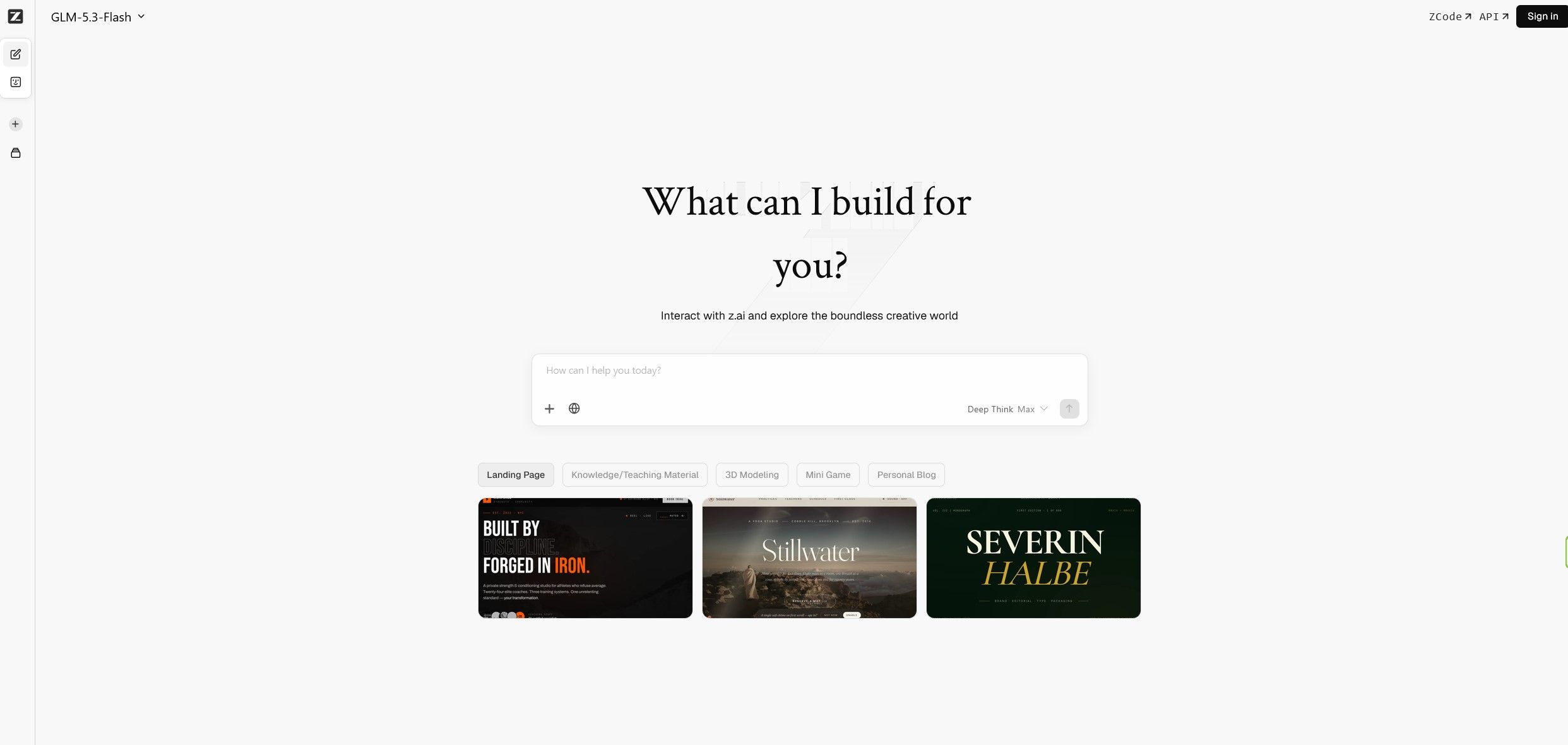
Artificial intelligence is changing the way people write, research, build software, analyze information, and create digital content. Tasks that once required several separate applications can increasingly be handled through a single AI-powered workspace. Z.AI is one of the platforms bringing these capabilities together, combining conversational AI with tools designed to support coding, reasoning, content creation, data analysis, and other practical projects.
For users exploring modern AI tools, Z.AI offers an opportunity to work with models from the GLM family through a conversational interface. Instead of treating AI as a simple question-and-answer service, users can explore different ways to turn instructions into useful outputs, from written explanations and structured documents to code, presentations, and creative concepts.
Whether you are a student researching a subject, a professional preparing reports, a developer working on an application, or a creator experimenting with new ideas, an AI assistant can become a useful part of your workflow. The important question is not simply which chatbot has the most features, but which platform helps you complete your actual tasks efficiently.
This guide explores Z.AI, its AI chat experience, model capabilities, practical applications, potential advantages, limitations, and factors worth considering before using it regularly. We will also look at how to get better results from AI prompts and how to decide whether the platform fits your personal or professional workflow.
Ready to Explore Z.AI?
Discover an AI workspace for writing, coding, research, data analysis, and creative projects.
Try Z.AIWhat Is Z.AI?
Z.AI is an artificial intelligence platform built around the GLM family of language models. Its chat interface gives users a way to interact with AI using natural language, making it possible to ask questions, explain a problem, request a draft, develop an idea, or work through a more complicated task in a conversational format.
The platform is relevant to people who want to use AI for more than casual conversations. Depending on the available model and interface features, it can support activities such as writing, coding, structured reasoning, information processing, and creating digital materials.
One of the useful aspects of conversational AI is that you do not need to learn a specialized programming language to begin. You can describe what you want to accomplish in ordinary language, review the response, and refine your instructions until the result better matches your requirements.
For example, a business owner might ask an AI assistant to outline a landing page, prepare a customer FAQ, and suggest improvements to product descriptions. A developer might use it to explain an unfamiliar function, generate an initial implementation, or investigate a software error. A student might request a structured explanation of a difficult concept and then ask follow-up questions about individual steps.
Z.AI is therefore best understood as a flexible AI workspace rather than a tool limited to one narrow content category. Its usefulness depends on the model available, the complexity of the task, the quality of the instructions, and how carefully the user reviews the output.
Explore the GLM AI Model Family
The GLM family is central to the Z.AI experience. These models are designed to handle natural-language instructions and a range of reasoning and generation tasks. Different model versions can have different strengths, performance characteristics, context limits, and supported capabilities.
For everyday users, the practical consideration is what a particular model can help them accomplish. A model that handles multi-step reasoning well may be useful for analyzing a complicated question, while strong code generation can help developers create, understand, and improve software.
The capabilities available through the chat interface may change as the platform introduces new models and updates existing ones. For that reason, it is worth checking the model selector and current product information rather than assuming every model offers identical functionality.
General-purpose AI assistance
A general-purpose language model can help with explanations, summaries, brainstorming, outlining, drafting, and organizing information. These tasks are useful across many professions because they reduce the effort required to move from an initial idea to a structured first draft.
For instance, you can provide a rough collection of ideas and ask the assistant to organize them into a logical outline. You can then request a more formal version, a shorter summary, or a checklist of actions that follow from the material.
Reasoning and problem-solving
Some GLM models are designed to support more demanding reasoning tasks. These can include working through technical questions, comparing alternatives, interpreting structured information, and explaining the steps involved in reaching a conclusion.
Reasoning features are especially useful when a task requires several connected decisions rather than a single short answer. Even so, a detailed explanation is not proof that the result is correct. Important calculations, factual claims, and technical recommendations should still be verified.
Coding and software development
Code generation is an important part of the GLM ecosystem. AI-assisted development can help users create initial implementations, explain existing code, investigate errors, write tests, and explore possible software architectures.
The quality of the result depends on the model, programming language, surrounding code, and clarity of the task. A small function with a clear specification is usually easier to generate reliably than a complete production application with many dependencies and undocumented requirements.
AI Writing for Work, Study and Everyday Tasks
Writing is one of the most accessible applications of an AI chatbot. You can use Z.AI to develop ideas, create outlines, rewrite paragraphs, adjust tone, and organize information into a format that is easier to read.
Rather than asking an AI assistant to write an entire document from a vague instruction, begin with the intended audience, purpose, tone, and desired structure. A clear request gives the model a better basis for producing relevant material.
Blog posts and website content
Website owners can use AI assistance to brainstorm article topics, develop outlines, draft introductory sections, prepare FAQs, and improve readability. It can also help turn a broad subject into a series of more specific questions that readers may want answered.
However, AI-generated content should not be treated as automatically publishable. Website owners should verify facts, add original insights, remove generic statements, and ensure that the finished article genuinely helps the intended audience.
For affiliate websites, this distinction is particularly important. A useful product guide should explain real differences between products or services, identify relevant selection criteria, and help readers make informed decisions. Merely generating large quantities of repetitive text does not guarantee quality or search visibility.
Emails and professional communication
An AI assistant can help draft professional emails, customer responses, project updates, meeting summaries, and internal documentation. You can request a more concise, friendly, formal, or persuasive tone depending on the situation.
It can also help reorganize a message when the main points are correct but the presentation is unclear. For example, a long explanation can be transformed into a short summary followed by a list of specific actions.
Editing and rewriting
AI writing support is not limited to creating text from scratch. You can provide an existing draft and request improvements to clarity, grammar, organization, or tone while retaining the original meaning.
When accuracy matters, explicitly instruct the assistant to preserve names, numbers, technical terms, and important qualifications. After rewriting, compare the output with the original to make sure that no important detail has been lost or changed.
Explore AI-Powered Writing and Productivity
See how a conversational AI assistant can support everyday writing and content workflows.
Explore Z.AIZ.AI for Coding and Software Development
Software development is one of the areas where AI assistants can provide practical value. Developers regularly need to understand unfamiliar code, implement repetitive functions, investigate errors, write documentation, and evaluate different approaches to a problem.
An AI coding assistant can help with these activities by generating examples, explaining programming concepts, suggesting implementation strategies, and helping users reason about potential solutions.
Generating code from natural-language instructions
You can describe the desired behavior of a function, script, or component and ask the model to generate an initial implementation. For better results, specify the programming language, expected inputs, output format, dependencies, and relevant constraints.
For example, instead of asking for a generic data-processing script, explain the file format, identify the columns, define how missing values should be handled, and describe the expected output. This reduces ambiguity and makes it easier to evaluate the generated code.
Debugging and understanding existing code
AI assistance can be useful when a program produces an unexpected result. Provide the relevant code, the error message, what you expected to happen, and what actually happened. Ask for a diagnosis and a proposed fix.
For complicated problems, request a step-by-step explanation of the suspected cause before applying changes. This helps you understand the proposed solution instead of copying code without knowing how it works.
Building websites and interfaces
Developers and technically curious users can experiment with AI-generated HTML, CSS, JavaScript, and application components. A prompt might describe a responsive landing page, a navigation menu, a dashboard, or a particular interaction.
The first output should be treated as a starting point. You may need to refine the layout, improve accessibility, test responsive behavior, and verify compatibility with the framework or platform used by your project.
Testing and code review
AI can help identify possible edge cases, suggest test scenarios, explain complex functions, and highlight areas that deserve closer review. It can also generate initial unit tests based on a function’s intended behavior.
These suggestions are not a substitute for executing tests, reviewing security-sensitive code, or following established development practices. Generated code may contain logical mistakes, insecure assumptions, or dependencies that are unsuitable for a production environment.
Who can benefit from AI coding assistance?
- Developers looking for help with routine implementation tasks.
- Students learning programming concepts and debugging techniques.
- Website owners experimenting with custom components.
- Technical teams preparing documentation and test cases.
- Experienced programmers exploring alternative implementations.
For beginners, the most useful approach is to ask the assistant to explain the code as well as generate it. For experienced developers, the value often comes from reducing repetitive work and exploring options more quickly.
Creating Presentations, Slides and Visual Concepts
Presentations often require more work than simply writing the text. Users must organize a story, decide which information deserves attention, and translate complex material into a sequence of clear slides.
Z.AI’s current interface includes presentation-related capabilities such as AI Slides and PPTMode. These tools can help users explore AI-assisted presentation creation, although the exact workflow and available output options may depend on the current platform configuration.
Preparing a presentation outline
Begin by specifying the topic, audience, presentation length, and main objective. Ask for a logical sequence of slides, with one central message for each slide and supporting points where necessary.
For a business presentation, the structure might include the problem, relevant evidence, proposed solution, implementation plan, expected outcomes, and next steps. For an educational presentation, the sequence might move from foundational concepts to examples and a concise recap.
Turning information into slide content
AI can help shorten lengthy explanations into presentation-friendly text. It can also suggest titles, summaries, examples, and questions that help an audience understand the subject.
Keep slides focused. A presentation becomes harder to follow when each slide contains several paragraphs or too many unrelated ideas. Use AI to identify the essential points, then review the material for accuracy and clarity.
Improving presentation quality
After generating an initial outline or presentation, check the flow between slides, consistency of terminology, factual accuracy, and suitability for the audience. Charts, statistics, quotations, and claims should be checked against reliable sources before being presented as facts.
For professional use, also consider visual consistency, readability, contrast, and whether the final presentation can be edited in the format your organization requires.
Data Analysis and Information Organization
Working with data often involves more than performing calculations. Users need to understand what the data represents, identify patterns, compare categories, and communicate findings in a way that supports decisions.
Z.AI’s interface includes a Data Insight capability, making data-oriented workflows one of the areas worth exploring. The usefulness of any analysis will depend on the data format, the supported inputs, and the model’s ability to interpret the information correctly.
Summarizing structured information
When working with tables or structured text, an AI assistant can help describe the contents, explain the meaning of fields, and suggest questions worth investigating.
For example, a small business might want to group customer feedback into recurring themes. A website owner might want to organize a list of content topics by intent, audience, or priority. A project manager might want to turn task notes into a concise status report.
Finding patterns and asking better questions
AI can help suggest possible patterns or follow-up questions, but those suggestions should not automatically be treated as confirmed findings. A model may overlook important context, misinterpret a field, or suggest a relationship that the data does not actually support.
For quantitative work, verify calculations independently and inspect the underlying data. When a result will affect financial, legal, operational, or other important decisions, use appropriate validation and expert review.
Preparing reports
Once the data has been analyzed, AI can help organize the findings into a report with an executive summary, key observations, limitations, and recommended next steps.
A good report distinguishes between what the data directly shows and what remains an interpretation. Ask the assistant to state assumptions explicitly and identify information that would be needed to support a stronger conclusion.
Creative Projects, Mini Games and 3D Concepts
AI tools are increasingly used for creative experimentation as well as conventional productivity. Z.AI’s interface highlights creative starting points that include 3D modeling, mini games, landing pages, and personal blogs.
These capabilities can be interesting for users who want to move from a simple idea toward an initial digital concept without beginning with a blank page.
Prototyping an idea
Suppose you want to explore a simple browser game, an interactive demonstration, or a personal project page. You can describe the intended audience, main interaction, visual direction, and essential functionality.
An AI-assisted workflow may help turn those requirements into an initial concept. You can then refine individual elements, test the result, and identify what needs further development.
Experimenting with 3D modeling
Creative users may explore AI-assisted workflows for 3D concepts and modeling-related tasks. The practical result depends on the tools and output formats currently supported by the platform.
For production work, verify whether the generated result can be exported into your preferred application and whether it meets your requirements for geometry, materials, scale, performance, and editability.
Building a personal blog or landing page
A personal blog or landing page can be a useful way to experiment with AI-assisted content and interface creation. Start with the purpose of the page, the intended audience, and the main action you want visitors to take.
Ask for a clear structure before requesting visual refinements. A well-organized page with a strong message and intuitive navigation is generally more useful than a visually elaborate design with unclear content.
How to Get Better Results from Z.AI
The quality of an AI response depends partly on how clearly you communicate the task. A short prompt can work for simple questions, but complex requests usually benefit from more context and explicit requirements.
Describe the intended outcome
Instead of asking the assistant to “help with a website,” explain whether you need a homepage outline, a product comparison, a responsive component, or an explanation of a technical problem.
A precise outcome helps the model focus on the result you actually need.
Provide relevant context
Include the audience, platform, programming language, tone, constraints, and other details that materially affect the answer. If you are asking for help with existing code, provide the relevant section rather than describing the problem in vague terms.
Specify the output format
Tell the assistant whether you want a table, checklist, step-by-step explanation, HTML snippet, report, presentation outline, or concise summary. This reduces the amount of reformatting required afterward.
Work in stages
For a complicated task, divide the work into manageable steps. First request an outline or plan, then review it, and finally ask for individual sections or implementation details.
This approach gives you more opportunities to catch misunderstandings before they affect the entire result.
Ask for assumptions and limitations
When the task is technical or factual, ask the model to identify assumptions, uncertainties, and information that should be verified. This can make the output easier to evaluate and reduce the risk of relying on unsupported claims.
Review the final result
Always check important information before publishing or acting on it. AI can generate plausible but incorrect facts, code that does not run, or recommendations that overlook important constraints.
Put Your Ideas into Practice
Explore Z.AI for coding experiments, writing, research, presentations, and creative workflows.
Get Started with Z.AIZ.AI for Students and Lifelong Learners
Students can use AI assistance to explore unfamiliar topics, break complicated ideas into smaller steps, and generate practice questions. This can make it easier to identify gaps in understanding and decide what to study next.
For example, you can request an explanation of a concept at an introductory level, followed by a more technical explanation. You can then ask for examples, a glossary of important terms, or a short quiz to check your understanding.
AI can also help organize research notes and create a preliminary outline for an assignment. However, users should verify factual claims, consult original sources, and follow their institution’s rules regarding AI-assisted work.
The strongest educational use is active learning rather than passive copying. Ask the assistant to explain why an answer works, identify common mistakes, and provide a new example that you can solve independently.
Z.AI for Business and Professional Productivity
Professionals often spend considerable time preparing documents, organizing information, writing updates, and creating initial drafts. AI assistance can help reduce the time required for these tasks, leaving more room for review and higher-value work.
Marketing and content planning
Marketing teams can use AI to brainstorm campaign concepts, develop content calendars, draft alternative headlines, and organize audience questions. The output should be refined to reflect the company’s brand, actual product features, and customer needs.
Business documentation
AI can help turn rough notes into meeting summaries, project briefs, internal procedures, and customer-facing explanations. Clear instructions about audience and purpose make these documents more useful.
Research and decision support
An AI assistant can help structure a comparison, list evaluation criteria, or identify questions that deserve investigation. It should not replace original research or be treated as an authoritative source for high-stakes decisions.
Small businesses and independent professionals
Freelancers and small businesses may benefit from using a single AI workspace for several types of work. Writing, brainstorming, code assistance, and document preparation can all form part of a broader workflow.
However, productivity gains depend on the task. Some activities are easy to accelerate with AI, while others require specialized knowledge, careful human judgment, or access to external systems that the assistant may not have.
Z.AI vs. a Traditional AI Chatbot
Many AI chatbots share a similar basic interaction: users enter a prompt and receive a response. The differences become more important when you consider the models, available tools, output formats, and workflows supported by each platform.
Z.AI is worth exploring if you want to investigate the GLM model family and experiment with AI use cases beyond ordinary conversation. Its interface highlights coding, writing, data insight, slides, and creative project workflows.
When comparing it with another AI assistant, consider the following factors:
- Model capabilities: How well does the available model handle your actual tasks?
- Reasoning: Can it work through multi-step problems clearly and reliably?
- Coding: Does it generate useful code and help explain or debug existing implementations?
- Creative tools: Does the interface support the kinds of projects you want to create?
- Usability: Is the workflow comfortable for regular use?
- Access and limits: Which features are available on your account and under what conditions?
- Cost: Does the available plan offer sufficient value for your usage?
- Privacy: Are the data-handling terms appropriate for the information you intend to submit?
There is no universal winner across every AI task. The most useful platform is the one that performs well on your own recurring work and fits your budget, technical requirements, and privacy expectations.
Pricing, Access and Plan Considerations
Before making Z.AI part of your daily workflow, check the current access options and terms directly through the platform. AI services can change their model selection, usage limits, subscription plans, and feature availability over time.
Do not assume that every capability is available without charge or that every model has identical usage limits. Some platforms distinguish between basic access, advanced models, higher usage allowances, and API-based services.
Evaluate your actual usage
Think about how frequently you expect to use the assistant and which tasks matter most. Occasional writing assistance has different requirements from daily software development or repeated analysis of large documents.
Check limits before relying on a feature
If you plan to use a specific model or workflow for professional work, verify the current limits and availability before making it essential to your process.
Compare the complete cost
Consider subscription costs, usage restrictions, and any additional services required for your workflow. The best value is not necessarily the cheapest plan; it is the option that provides the capabilities you will actually use.
Privacy and Responsible Use
Before entering information into any AI platform, consider whether the material is appropriate to share with an external service. This is especially important for confidential business documents, personal information, customer records, proprietary code, and other sensitive material.
Review the current privacy policy and terms of service to understand how information may be processed, retained, and used. If you are using AI at work, follow your organization’s security policies and any applicable contractual or regulatory requirements.
Do not assume that a conversational interface automatically provides the same privacy protections as a local application or a specially configured enterprise system.
It is also important to use AI responsibly. Verify important claims, respect intellectual property, and avoid presenting generated material as independently verified when it has not been checked.
Limitations to Consider Before Choosing Z.AI
AI tools can be useful, but they are not flawless. Understanding their limitations makes it easier to decide where they belong in your workflow.
Responses can contain mistakes
A model may produce an incorrect explanation, outdated information, or an answer that sounds confident despite being wrong. Verify facts that materially affect your work.
Generated code needs testing
Code can contain bugs, security weaknesses, missing dependencies, or incorrect assumptions. Test generated implementations in an appropriate environment before using them in production.
Complex tasks require clear requirements
Vague instructions can lead to generic or incomplete results. More demanding projects may require several rounds of clarification, careful evaluation, and human expertise.
Features can change
AI platforms evolve quickly. Model names, supported tools, usage limits, and interface options may change, so confirm the current capabilities before depending on a specific feature.
Human judgment remains important
AI can help generate options and organize information, but users remain responsible for deciding whether the output is accurate, suitable, safe, and appropriate for its intended purpose.
Who Should Consider Using Z.AI?
Z.AI may be worth exploring for a broad range of users, particularly those interested in the GLM model family and conversational AI workflows.
- Content creators who need help brainstorming, outlining, drafting, and refining material.
- Developers who want assistance with code generation, explanations, debugging, and software concepts.
- Students who want explanations, examples, study questions, and help organizing learning materials.
- Professionals who prepare reports, summaries, presentations, and structured documents.
- Entrepreneurs who want to explore ideas, plan digital projects, or draft business materials.
- Creative users interested in experimenting with AI-assisted websites, presentations, mini games, or 3D concepts.
- AI enthusiasts who want to explore the capabilities of GLM-based tools.
The best way to evaluate the platform is to test it against a few tasks you regularly perform. A practical trial will tell you more about its usefulness than a long list of general feature claims.
Getting Started with Z.AI
If you are new to the platform, start with a small project that has a clear goal. This makes it easier to evaluate the quality of the output and understand how to improve your prompts.
- Open the platform. Visit Z.AI through the link below and review the current interface.
- Choose an appropriate task. Start with writing, coding, research, data organization, or another supported workflow.
- Write a specific prompt. Explain the goal, context, constraints, and expected format.
- Review the result. Check accuracy, completeness, relevance, and formatting.
- Refine the output. Ask follow-up questions or request targeted changes instead of starting over unnecessarily.
- Verify important details. Test code, check factual claims, and review any material intended for publication.
After experimenting with several tasks, you will have a clearer understanding of where the platform saves time and where another tool or a manual workflow may be more appropriate.
Explore Z.AI for Your Next Project
Try AI-assisted writing, coding, research, presentations, and creative workflows. Start with a practical task and see how the platform fits your needs.
Visit Z.AIFrequently Asked Questions About Z.AI
What is Z.AI used for?
Z.AI is an AI platform that provides access to GLM-based conversational AI. Depending on the current model and interface, users can explore writing, reasoning, coding, data-related workflows, presentation creation, and other creative tasks.
What are GLM models?
GLM is a family of AI models developed for language-related tasks and other capabilities. Different versions can have different strengths, context limits, and supported features.
Can Z.AI help with coding?
Yes. Coding is one of the use cases associated with the GLM model family. An AI assistant can help generate code, explain functions, suggest debugging steps, and explore implementation ideas. Generated code should always be reviewed and tested.
Can Z.AI help write articles and other content?
It can help brainstorm topics, create outlines, draft text, summarize information, and revise existing content. Important facts should be verified, and published material should be edited to provide original value to its intended audience.
Can Z.AI create presentations?
The platform interface includes presentation-related capabilities such as AI Slides and PPTMode. Check the current interface to confirm which options are available to your account and what output formats they support.
Can beginners use Z.AI?
Conversational AI is accessible to beginners because tasks can be described in natural language. Beginners can start with simple questions or small projects and gradually learn how to write more precise prompts.
Is Z.AI suitable for business use?
It may be useful for drafting documents, organizing information, exploring ideas, preparing presentations, and assisting with development work. Businesses should review the service terms, privacy practices, and internal policies before submitting confidential information.
Is Z.AI free?
Access options, usage limits, and paid features can change. Check the current Z.AI interface and subscription information for the latest details rather than relying on an assumed pricing structure.
Can Z.AI replace a software developer?
AI can assist with coding tasks, but it does not eliminate the need for software engineering judgment, testing, security review, maintenance, and understanding the broader application. It is best treated as an assistant rather than an automatic replacement for professional development.
Does Z.AI always provide accurate answers?
No. Like other AI systems, it can make mistakes, misunderstand instructions, or produce unsupported claims. Verify important information and test technical output before relying on it.
Can I use Z.AI for research?
You can use an AI assistant to structure research questions, explain concepts, organize notes, and identify topics worth investigating. Verify important claims against reliable sources, especially when the information is current or consequential.
How can I get better results from Z.AI?
Give clear instructions, provide relevant context, specify the desired format, and divide complicated tasks into manageable stages. Review the response and use follow-up prompts to correct gaps or improve the result.
Is Z.AI suitable for creative projects?
The platform highlights creative workflows that include landing pages, mini games, personal blogs, 3D modeling, and presentation creation. The exact capabilities and export options should be checked in the current interface.
Explore More AI Tools on CatalogSpot
Z.AI is one option in a growing ecosystem of AI tools designed to support writing, software development, research, productivity, and creative work. Different platforms have different strengths, so it is worth comparing them against the tasks you perform most often.
When evaluating an AI service, focus on practical results, supported features, ease of use, access limits, privacy, and overall value. A tool becomes useful when it helps you complete real work more effectively, not simply when it offers an impressive feature list.
If you want to explore more platforms, visit the CatalogSpot AI Tools category to discover additional services and find options that match your workflow.
Discover More AI Tools
Explore AI platforms for productivity, content creation, software development, and digital projects.
Explore AI Tools