
Grammarly Review – AI Writing Assistant, Grammar Checker & Writing Tools
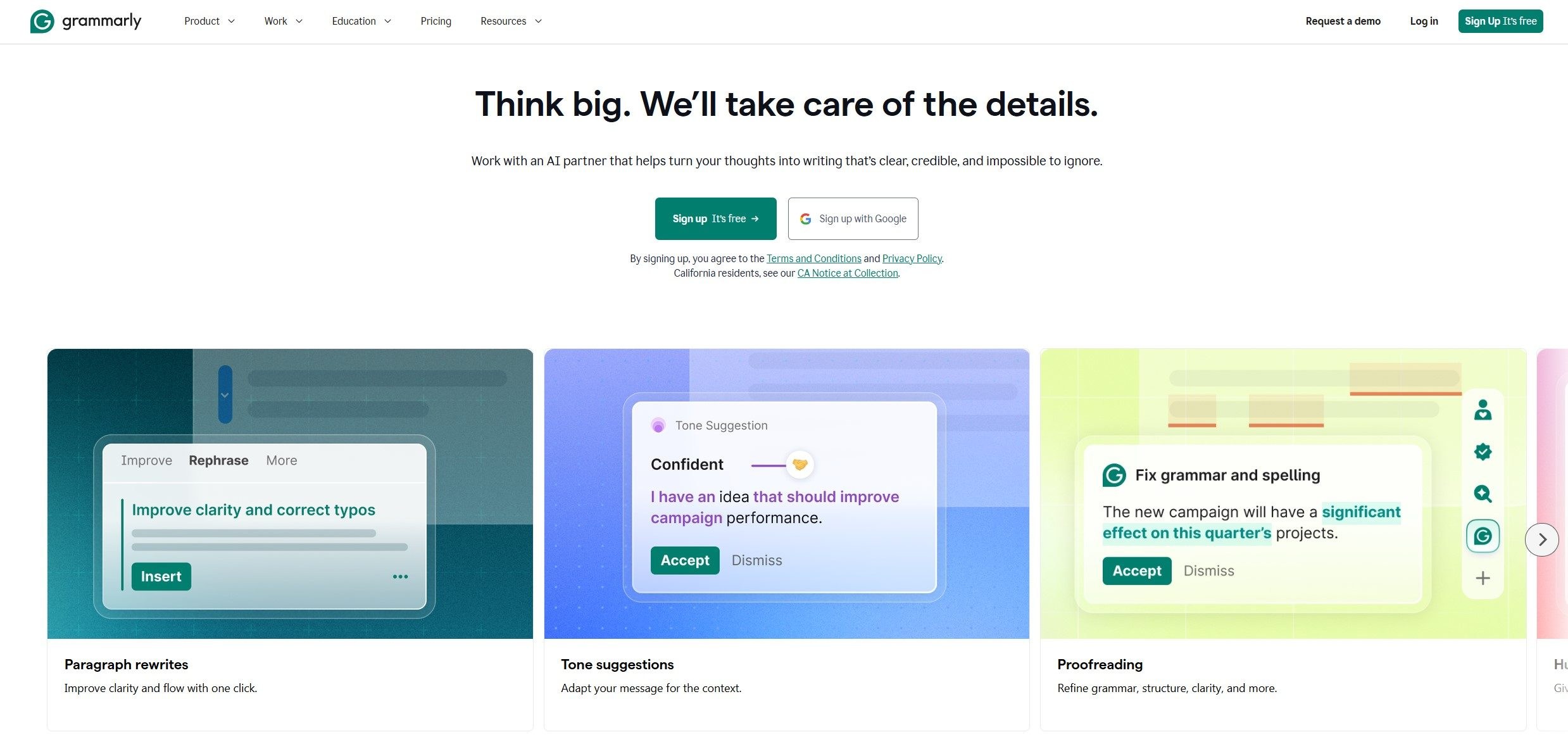
Clear and effective writing is essential for professional communication, education, marketing, and everyday work. Whether you are preparing an important business email, writing a blog post, editing a report, or completing an academic assignment, the quality of your writing can influence how other people understand your message. Grammarly is an AI-powered writing assistant designed to help users communicate more clearly, correct mistakes, improve readability, and adapt their writing to different audiences.
Grammarly has developed beyond a traditional grammar checker. Its platform combines spelling and grammar correction with AI writing assistance, sentence rewriting, tone suggestions, paraphrasing, and additional tools for developing and refining written content. These capabilities make Grammarly relevant to students, professionals, freelancers, marketers, bloggers, content creators, and organizations that want to improve written communication across their workflows.
One of Grammarly’s main advantages is its focus on helping people write within the applications and websites they already use. Instead of treating editing as an entirely separate task, Grammarly provides writing support through compatible browsers, devices, and writing environments. Depending on the product and subscription, users can access different levels of correction, AI assistance, and advanced writing features.
In this Grammarly review, we explore the platform’s main features, practical applications, pricing considerations, advantages, limitations, and potential alternatives. We also explain who may benefit most from Grammarly and what to consider before choosing a subscription.
Explore Grammarly
Discover AI-powered writing assistance, grammar correction, and tools designed to help you communicate with greater clarity.
Visit Grammarly Official WebsiteAffiliate Disclosure: CatalogSpot may earn a commission from qualifying links at no extra cost to you. Prices and features may change, so check the provider's website before purchasing.
What Is Grammarly?
Grammarly is a writing assistance platform that uses language technology and artificial intelligence to help people improve the quality of their written communication. It identifies potential problems in text and offers suggestions intended to make writing more accurate, readable, concise, and appropriate for its intended audience.
The platform can support many everyday writing tasks, including emails, online messages, articles, essays, reports, presentations, professional correspondence, and marketing materials. Rather than focusing exclusively on whether a sentence is grammatically correct, Grammarly can also help users consider how a message sounds, whether its meaning is clear, and whether its wording fits the situation.
For example, a sentence may be grammatically correct but still sound too informal for a business proposal. Another sentence might contain unnecessary words that make an important point difficult to understand. Grammarly can offer suggestions for these situations, allowing users to revise their writing without having to identify every possible improvement themselves.
Its AI capabilities expand the process further. Users can request help brainstorming ideas, drafting content, rewriting paragraphs, summarizing information, or producing alternative versions of a message. These features can be useful when starting a document, responding to an email, or improving a draft that does not yet communicate its intended message effectively.
Grammarly is designed for both occasional and frequent writers. Someone who writes a few emails a day may appreciate the convenience of automatic corrections, while a content creator who produces articles regularly may benefit from a broader collection of editing and AI writing tools.
Grammarly Features and Tools
Grammarly offers a collection of writing and AI features designed to support different stages of the writing process. Some tools focus on correcting mistakes, while others help users generate new material, refine existing content, or adjust the way a message communicates its meaning.
1. Grammar Checker
Grammar checking is one of Grammarly’s core capabilities. The tool identifies potential grammatical problems and suggests corrections intended to make sentences more accurate and easier to understand. It can help users recognize issues involving sentence construction, word choice, agreement, and other common writing mistakes.
This feature is useful for people who write frequently but do not always have time to proofread every sentence carefully. Business professionals can use it to review correspondence before sending it to clients or colleagues. Students can use it to identify errors in essays and assignments. Bloggers and freelance writers can incorporate it into their editing process before publishing content.
Grammar checking can also be helpful for people who understand English well but occasionally struggle with complex sentence structures or less familiar grammatical conventions. Rather than replacing the writer’s judgment, Grammarly provides suggestions that can be accepted, modified, or ignored according to the context.
Automated grammar tools are not infallible. A suggested correction may change the intended meaning, and a technically correct sentence may be appropriate even if the software recommends a different construction. Important documents should still receive a careful human review.
Check your writing for grammar mistakes and improve the clarity of your sentences.
Explore Grammar Checker2. Spelling and Punctuation Correction
Spelling and punctuation mistakes can distract readers and make otherwise strong writing appear less professional. Grammarly helps identify common spelling errors, missing punctuation, misplaced commas, and other issues that can affect readability.
These checks are particularly helpful when writing quickly. Emails, internal messages, social media posts, and short business documents are often created under time pressure, making small mistakes easy to overlook. A writing assistant can provide an additional review before the message reaches its intended audience.
Punctuation can also affect meaning. Long sentences with unclear boundaries may be difficult to follow, while inconsistent punctuation can make a document appear unfinished. Grammarly’s suggestions can help writers produce cleaner text and maintain a more consistent style.
Writers should nevertheless review corrections in context. Technical terminology, product names, acronyms, and deliberately informal expressions may not follow standard dictionary conventions. The best results come from combining automated assistance with an understanding of the subject and audience.
3. AI Writing Assistant
Grammarly’s AI writing assistant helps users generate ideas, draft text, and revise existing material. Instead of correcting individual mistakes only, users can describe what they want to accomplish and ask the AI to help produce a suitable starting point.
For example, a user might request an outline for a blog article, a more concise version of a business report, or a professional response to a customer inquiry. The assistant can generate a draft that the user can then review and adapt. This approach can reduce the time spent staring at a blank page and make it easier to move from an initial idea to a workable document.
The writing assistant can also help users explore different ways to express the same idea. A message intended for a colleague may need a different tone from a proposal sent to a potential client. AI assistance can provide alternative wording, allowing the writer to choose the version that best fits the relationship and purpose.
One of Grammarly’s defining characteristics is its relationship with existing writing workflows. Rather than treating AI writing as a completely separate activity, the platform aims to provide support in the applications and websites where people already create text.
AI-generated material should always be checked for factual accuracy, relevance, and originality of thought. Grammarly can help with expression, but the user remains responsible for the information being communicated.
Generate ideas, draft content, and refine your writing with AI-powered assistance.
Discover AI Writing Assistant4. AI Chat
Grammarly AI Chat allows users to interact with an AI assistant through conversational prompts. It can help with brainstorming, explaining information, drafting text, refining ideas, and improving written material through follow-up instructions.
A conversational interface is useful when a task requires several steps. A user might begin by asking for an outline, request a more formal approach, and then ask for a shorter version aimed at a particular audience. Instead of treating each instruction as an unrelated task, the conversation provides a way to refine the output progressively.
AI Chat can also help users overcome creative blocks. When someone is unsure how to begin an article, organize a report, or respond to a complicated message, the assistant can suggest possible directions. The user can then select the most relevant ideas and develop them further.
It can be used for writing-related tasks and other information requests, depending on the available interface and features. However, AI-generated explanations may contain inaccuracies or omit important details. Users should verify claims, particularly when working with technical, financial, legal, medical, or otherwise consequential information.
For writers who already use conversational AI tools, Grammarly’s main attraction is its relationship with a broader writing workflow. It brings conversational assistance together with tools for correcting and improving the final text.
Explore conversational AI support for brainstorming, drafting, and revising written content.
Try Grammarly AI Chat5. Sentence Rewriting and Paraphrasing
Sometimes a sentence is technically correct but does not express an idea as effectively as it could. Grammarly’s rewriting and paraphrasing capabilities help users explore alternative wording while retaining the intended meaning.
This can be useful when a paragraph is repetitive, a sentence is unnecessarily complicated, or a draft sounds too informal for its intended purpose. Users can request a clearer, shorter, more polished, or differently phrased version and then decide whether the alternative improves the original.
Paraphrasing is also useful during editing. Writers frequently repeat the same words or sentence patterns across a long document. Alternative phrasing can improve flow and make the text more engaging without requiring a complete rewrite.
For content creators, the feature can support the revision of introductions, transitions, product descriptions, marketing copy, and other text-heavy material. Professionals can use it to make requests more diplomatic or communicate complex ideas in simpler language.
Paraphrasing should not be treated as a substitute for original research or proper attribution. Rewording a source does not remove the obligation to credit ideas that belong to someone else. Academic writers and researchers should follow the citation requirements of their institution or publisher.
Rewrite sentences, explore alternative wording, and improve the flow of your text.
Explore Paraphrasing Tool6. Tone Detection and Tone Adjustment
The tone of a message influences how readers interpret its intention. A short sentence can sound confident, neutral, friendly, or unnecessarily abrupt depending on its wording. Grammarly helps users understand aspects of their writing tone and, where supported, suggests ways to adjust it.
This feature is particularly useful for workplace communication. An email asking for an update should be direct enough to communicate the request but polite enough to preserve a productive relationship. A customer support response may need to sound empathetic, while a proposal should communicate professionalism and confidence.
Tone adjustment can also help freelancers and international professionals who write in English as an additional language. Even when the grammar is correct, subtle differences in phrasing can influence whether a message feels natural or appropriate for a particular situation.
For marketing teams, tone consistency matters across product descriptions, email campaigns, landing pages, and customer communications. Grammarly’s writing suggestions can support this process by helping users revise wording to better match the intended voice.
Automatic tone analysis should be understood as guidance rather than a definitive interpretation of how every reader will react. Relationships, culture, subject matter, and surrounding context all affect communication. Users should consider the intended audience before accepting a tone-related recommendation.
7. Clarity, Conciseness, and Readability
Good writing communicates ideas efficiently. Grammarly can help identify opportunities to make text clearer, remove unnecessary words, and improve sentence flow. These suggestions can be valuable when a document contains long sentences, repetitive phrasing, or complicated explanations.
Clarity is especially important in professional environments. Project updates, technical documentation, business proposals, and instructions often need to communicate information to people with different levels of expertise. Simplifying the language can help readers understand the main point without losing essential detail.
Concise writing is not simply about making every sentence shorter. Some subjects require technical detail or careful qualifications. The goal is to remove unnecessary complexity while preserving the information readers need. Grammarly’s suggestions can help identify possible improvements, but writers should ensure that important nuances remain intact.
Bloggers can use clarity suggestions to improve article flow and reduce repetition. Students can use them to make arguments easier to follow. Professionals can use them to produce more direct emails and reports.
The most effective editing process combines readability improvements with a clear understanding of the document’s purpose. A short internal message and a detailed research report require different levels of explanation, even when both benefit from clear language.
8. AI Proofreading and Writing Feedback
Grammarly’s AI-powered proofreading capabilities extend beyond identifying isolated spelling and grammar mistakes. Its writing assistance can help users strengthen phrasing, review structure, and identify areas where a document might benefit from additional explanation.
Proofreading is an important final step for nearly every type of written content. Even experienced writers can miss repeated words, awkward transitions, or small errors when they have spent a long time working on the same document. An additional automated review can highlight issues that deserve attention.
Writing feedback can also help users evaluate how effectively a draft communicates its main point. A paragraph might contain accurate information but still lack a clear topic sentence. An email might describe a problem without explaining the action required from its recipient. Suggestions can help the writer identify opportunities to make the message more useful.
For longer documents, proofreading should be combined with structural editing. Automated suggestions are useful for individual sentences, but they cannot always determine whether the entire argument is logical, whether the evidence is sufficient, or whether the document answers the right question.
9. AI Writing Tools and Content Generation
Grammarly provides AI writing tools intended to help users create specific types of content. Depending on the available tool, these may support article drafting, brainstorming, outline creation, email writing, summaries, headlines, professional documents, and other common writing tasks.
Specialized writing tools can be useful when the user already knows the type of content they need but wants help getting started. A blog writer may need several headline ideas. A job applicant may want an initial cover letter draft. A manager may need a concise summary of a project or a starting point for a business report.
Focused prompts and templates can reduce the amount of instruction a user must formulate from scratch. They can also make it easier for beginners to experiment with AI writing without learning complex prompting techniques.
The output should be considered a draft rather than a finished publication. Writers need to check facts, adapt the language to their audience, remove generic statements, and add relevant details that an AI system could not know. This is especially important for articles intended to demonstrate first-hand experience or specialist expertise.
Explore AI tools that can help you develop ideas and produce written content more efficiently.
Browse AI Writing Tools10. Plagiarism Checker
Grammarly offers plagiarism checking in eligible product offerings. This type of tool can help writers identify passages that may match existing sources and determine whether additional citations or revisions are necessary.
For students, researchers, and professional writers, originality checks can form part of a broader quality-control process. Identifying a potential match can prompt the writer to review the source, add a citation, or revise material that has been reproduced too closely.
Plagiarism detection has important limitations. A similarity result is not automatically proof of misconduct, because common phrases, correctly quoted material, and properly cited passages may also resemble existing text. Conversely, the absence of a detected match does not establish that every idea or sentence is original.
Users should review potential matches carefully and follow the standards that apply to their work. Academic institutions, publishers, and businesses may have different requirements concerning quotations, citations, source attribution, and acceptable reuse of material.
Review your writing for potential similarities with existing published material.
Explore Plagiarism Checker11. Citation Generator
Academic writing often requires citations in a specific format. Grammarly provides citation-related resources that can help users prepare references in styles such as APA, MLA, and Chicago, subject to the functionality of the relevant tool.
Citation support can be helpful when preparing essays, research assignments, reports, and other documents that reference external sources. Correct formatting helps readers identify the material used and locate the original source when they want to verify a claim or explore a subject further.
However, citation formatting and source verification are separate tasks. A citation generator may help arrange bibliographic information, but users still need to confirm that the source exists, that its details are correct, and that it actually supports the statement being made.
Students and researchers should also follow the specific rules provided by their institution or publisher. Requirements may differ in areas such as in-text citations, reference lists, footnotes, and source attribution.
Prepare citations and references for academic and research writing.
Explore Citation GeneratorHow Grammarly Works Across Different Applications
One of Grammarly’s main advantages is its emphasis on providing assistance within existing writing environments. Many people create text across multiple applications during the same working day. They may write emails in a browser, prepare reports in a document editor, communicate in team collaboration software, and publish content through a content management system.
Switching between separate writing tools can interrupt concentration. A user who repeatedly copies text into an editor, makes corrections, and pastes it back into the original application may lose time and context. Grammarly is designed to reduce this friction by making supported writing assistance available in a broad range of apps and websites.
The exact experience depends on the installation method and the application being used. Browser extensions can provide suggestions in supported web-based text fields. Desktop and mobile products may offer different capabilities, and not every feature is necessarily available everywhere.
Before adopting Grammarly for a specific workflow, users should check compatibility with their browser, operating system, preferred office software, and other essential applications. This is particularly important for people who rely on specialized editing environments or work with sensitive information.
Browser Extension
The browser extension is a convenient option for users who spend much of their time writing online. It can help review text in supported web applications without requiring a separate editing session for every message or document.
This can be useful for email, online forms, social media posts, web-based documents, and other text fields. Users should review the current compatibility information because support and available features can vary between applications and browsers.
Find out how Grammarly can assist with writing in supported browser environments.
Explore Browser ExtensionDesktop and Mobile Writing
People who write on multiple devices may benefit from using Grammarly in more than one environment. Desktop access can support longer documents and professional workflows, while mobile writing assistance can help with messages, notes, and other short-form content.
Availability and functionality vary by platform, so users should verify the current requirements before installing the product. A feature that works in one environment may behave differently in another.
Who Should Use Grammarly?
Grammarly can serve a wide range of users because written communication is part of so many professional and personal activities. Its value depends on how often someone writes, which applications they use, and whether they need basic correction or more advanced AI support.
Students and Academic Writers
Students can use Grammarly to identify grammar mistakes, improve clarity, and review essays, reports, and other assignments. It can also help users explore alternative phrasing and make complicated sentences easier to follow.
Academic users should pay attention to their institution’s policies on AI-assisted writing. Some assignments may permit grammar correction but restrict the use of generated text. Students should verify sources, maintain appropriate citations, and ensure that their submissions reflect their own understanding.
Bloggers and Content Creators
Bloggers can use Grammarly throughout the content production process, from developing initial ideas to reviewing a finished article. AI writing tools may help with outlines, headlines, introductions, summaries, and sentence revisions.
For website owners, readability is important because online readers often scan content before deciding which sections deserve closer attention. Clear headings, concise paragraphs, and direct explanations can improve the user experience.
Grammarly is not a complete SEO platform. It does not replace keyword research, competitor analysis, technical SEO, structured data, or performance measurement. Website owners should use it as a writing and editing aid alongside their existing SEO workflow.
Freelancers and Remote Professionals
Freelancers often communicate with clients through proposals, emails, project updates, invoices, and deliverables. Clear writing helps establish expectations and reduce misunderstandings. Grammarly can provide a useful additional review before important messages are sent.
Remote workers may communicate primarily through written channels, making tone and clarity particularly important. A short message that seems obvious to its author can be interpreted differently by someone who lacks the same context. Writing suggestions can help make requests and explanations more explicit.
Marketing Teams
Marketing professionals produce a large variety of written materials, including advertising copy, landing pages, email campaigns, product descriptions, and social media content. Grammarly can support the editing process by identifying mistakes and helping writers adapt tone and wording to different audiences.
Teams that maintain a consistent brand voice may also benefit from relevant style and customization capabilities available in suitable plans. However, brand terminology, product claims, and legal wording should be reviewed against internal guidelines before publication.
Business Owners and Customer Support Teams
Business owners can use Grammarly to improve customer correspondence, proposals, website copy, internal documentation, and other written communication. Customer support teams may benefit from clearer replies and more consistent phrasing when responding to common questions.
AI assistance can help draft an initial response, but human review remains important when a message concerns a complaint, refund, contractual issue, or unusual customer situation. Automated wording should not replace accurate information or appropriate decision-making.
Non-Native English Writers
People who use English as an additional language may find Grammarly helpful for reviewing grammar, spelling, sentence structure, and tone. It can offer immediate feedback during everyday writing and help users notice patterns in their mistakes.
Writing assistance should be viewed as a learning aid rather than a substitute for language development. Reviewing why a suggestion improves a sentence can be more valuable over time than accepting every correction automatically.
Grammarly Pricing and Plans
Grammarly offers a free plan and paid options designed for individuals and larger organizations. The available features and usage allowances differ by plan, so the right choice depends on how frequently you write and which tools you need.
The Free plan provides a starting point for users who want writing correction and access to selected AI capabilities. It can be suitable for everyday messages, basic proofreading, and occasional writing assistance.
The paid Pro plan is designed for users who need more advanced writing support. Depending on the current offer and plan terms, it may include additional rewriting capabilities, expanded AI prompt allowances, personalized suggestions, and originality-related tools.
Grammarly also offers options for larger organizations through its enterprise-oriented product offering. Businesses may need additional administrative controls, security capabilities, support, and ways to manage usage across a team.
| Plan | Best For | What to Consider |
|---|---|---|
| Free | Individuals getting started with writing assistance | Core corrections and selected AI capabilities with usage limits |
| Pro | Frequent writers, professionals, and content creators | Expanded writing and AI features, subject to current plan terms |
| Enterprise | Organizations with broader communication needs | Administrative, security, and organizational requirements |
Pricing, included features, promotional offers, and billing terms can change. Check the official pricing page before subscribing, and review whether the displayed price applies to monthly or annual billing. If a free trial or introductory offer is available, read the renewal and cancellation terms carefully.
Compare Grammarly Plans
Review the latest subscription options and choose the level of writing assistance that fits your needs.
View Official PricingGrammarly Advantages
Grammarly’s strongest advantage is the way it combines writing correction with additional assistance for drafting and revising text. Rather than focusing on one isolated task, the platform can support several stages of the writing process.
- Convenient writing assistance: Support is available across many supported applications and websites, reducing the need to move text between separate tools.
- Grammar and spelling correction: The platform helps identify common mistakes before text is shared or published.
- AI-powered drafting: Users can generate initial drafts, brainstorm ideas, and request alternative wording.
- Tone and clarity support: Suggestions can help make messages more appropriate for their audience and purpose.
- Flexible use cases: The same platform can assist with emails, articles, reports, academic writing, and professional correspondence.
- Free starting option: Users can explore basic writing support without immediately committing to a paid subscription.
- Useful for frequent writers: People who write throughout the day may benefit from having assistance integrated into their usual workflow.
- Additional writing resources: Grammarly provides specialized tools for tasks such as paraphrasing, citation preparation, and originality review.
These advantages are most relevant when writing quality and editing efficiency matter regularly. Users who only need to check a short paragraph occasionally may not need a comprehensive writing platform, while people who produce substantial amounts of text may appreciate the broader feature set.
Grammarly Limitations
Although Grammarly can improve many aspects of written communication, it is not a replacement for human judgment, specialist knowledge, or a complete content production workflow. Understanding its limitations helps users set realistic expectations.
- Not every suggestion is correct: Automated recommendations can overlook context, change the intended meaning, or prefer wording that does not fit the situation.
- Advanced features may require payment: Users who need expanded AI assistance or particular review tools should check the current subscription requirements.
- Feature availability varies: The experience can differ across browsers, applications, devices, and plans.
- AI-generated content requires review: Generated text may contain inaccurate claims, generic language, or information that needs independent verification.
- It is not a complete SEO suite: Grammarly can help improve content quality but does not replace specialist keyword research and technical SEO tools.
- Originality tools have limitations: Plagiarism and AI detection results should be interpreted carefully rather than treated as definitive judgments.
- Language support may vary by feature: Users should confirm that the language and specific writing tasks they need are supported.
- Privacy requirements matter: Organizations and individuals handling confidential material should review the applicable privacy, security, and data-handling terms.
These limitations do not make Grammarly unsuitable. They simply mean that it works best as an assistant within a responsible writing process. Users should accept suggestions selectively, verify important information, and retain control over the final text.
Grammarly and Data Privacy
Privacy is an important consideration for any tool that processes written content. Emails, business documents, academic work, and customer communications may contain information that should not be shared unnecessarily. Before using Grammarly in a professional environment, users should understand the product’s current privacy policy and the terms that apply to their account.
Organizations may have additional requirements concerning confidential information, personal data, regulated records, or intellectual property. The availability of enterprise-oriented security features does not automatically mean that every deployment is suitable for every type of sensitive information. Businesses should evaluate the actual controls, contractual terms, and configuration options available to them.
Individual users should also be careful when working with confidential documents. Avoid entering sensitive information into any online service unless its use is permitted by the relevant policy and appropriate safeguards are in place.
For the most accurate information, consult Grammarly’s official privacy documentation rather than relying solely on general descriptions of its features.
Review Grammarly’s official privacy information before using the platform for sensitive work.
Read Privacy PolicyGrammarly vs. Traditional Grammar Checkers
Traditional grammar checkers generally focus on identifying language errors and offering corrections. Grammarly includes this type of functionality but also provides additional assistance for rewriting, drafting, tone adjustment, and AI-supported writing tasks.
The distinction matters because writing involves more than producing grammatically correct sentences. A document can contain no spelling mistakes and still be difficult to follow, too repetitive, poorly organized, or unsuitable for its intended audience.
Grammarly’s broader approach is designed to address some of these issues by combining corrections with suggestions about wording and communication. Its AI features can also help users create a first draft rather than waiting until a document has been written before beginning the editing process.
However, users who only need basic spellchecking may prefer a simpler tool already included in their word processor. Grammarly’s additional capabilities are most valuable when users regularly need more comprehensive feedback or want writing assistance across multiple applications.
Grammarly vs. General-Purpose AI Chatbots
General-purpose AI chatbots can generate text, answer questions, explain concepts, and assist with a wide variety of tasks. Grammarly’s emphasis is more closely connected to writing quality and assistance within the user’s existing workflow.
A standalone chatbot may be useful when a task requires extensive research, detailed planning, or a long conversation about a complex subject. Grammarly can be attractive when the immediate goal is to improve a sentence, refine an email, adjust tone, or receive writing support within a supported application.
The two approaches are not mutually exclusive. A content creator might use a general AI assistant to brainstorm an article, then use Grammarly to review the wording and polish the draft. A business professional might use a chatbot to develop a plan and Grammarly to improve the messages used to communicate it.
The best choice depends on the task. Users should compare tools based on the quality of their outputs, compatibility with their workflow, feature requirements, privacy needs, and total cost rather than assuming that one category can replace the other entirely.
How to Get Started with Grammarly
Getting started is straightforward. The best approach is to begin with a real writing task and determine which features provide meaningful value before considering a paid plan.
- Visit the official website. Explore Grammarly’s current product offering and available account options.
- Create an account. Review the registration process and choose the available option that suits your needs.
- Select your preferred access method. Depending on your workflow, you may want to explore browser, desktop, mobile, or supported writing environments.
- Test the grammar checker. Review a non-sensitive piece of text and examine the suggestions provided.
- Experiment with AI assistance. Try a simple task, such as rewriting an email, brainstorming article ideas, or making a paragraph clearer.
- Review every suggestion. Check that corrections preserve the intended meaning and that generated content is accurate.
- Evaluate your usage. After using the free features, determine whether the additional capabilities of a paid plan justify the cost.
Starting with a specific goal makes it easier to evaluate Grammarly objectively. For example, a blogger may focus on editing articles, while a professional may primarily want clearer emails and more effective business communication.
Start Writing with Grammarly
Explore writing tools and see how Grammarly can support your everyday communication.
Get Started with GrammarlyTips for Getting Better Results from Grammarly
Grammarly can be more useful when users provide clear instructions and review the output deliberately. The following practices can help you get more value from the platform.
Define the Purpose of Your Text
Before requesting an AI rewrite, decide what the text should accomplish. An email intended to secure a meeting needs a different approach from a message intended to explain a technical problem. Clear objectives help you evaluate whether a suggested revision actually improves the result.
Identify Your Audience
Consider who will read the document and what they already know. A technical report for specialists may require terminology that would confuse a general audience. A customer-facing explanation may need simpler language and additional context. Audience awareness should guide which suggestions you accept.
Use Specific AI Instructions
Instead of asking an AI assistant to make text better, explain the improvement you want. You might request a shorter paragraph, a more professional tone, simpler wording, or an email that clearly states the next action. Specific instructions provide a more useful basis for evaluating the result.
Keep Your Own Voice
Automated revisions can make writing sound polished, but excessive rewriting may remove the details and expressions that make a message personal. Review the final version and restore any wording that communicates your intention more accurately.
Verify Facts and Sources
Grammar and writing assistance do not guarantee factual accuracy. Check dates, figures, quotations, product specifications, and claims against reliable sources. If a document contains specialist information, ask a qualified person to review it when appropriate.
Use AI as an Editing Partner
Rather than accepting every suggestion automatically, compare the original and revised text. Understanding why a sentence is clearer can improve your writing skills over time. This approach also helps you identify cases where the software’s suggestion does not fit your intended meaning.
Frequently Asked Questions About Grammarly
Is Grammarly free to use?
Yes. Grammarly offers a Free plan that provides access to core writing assistance and selected AI capabilities. The included features and usage limits may change, so check the official plans page for the latest details. Advanced features may require a paid subscription.
What is Grammarly used for?
Grammarly helps users improve written communication by checking grammar, spelling, and punctuation, suggesting clearer wording, adjusting tone, and providing AI assistance for drafting and rewriting text. It can be used for emails, articles, reports, academic assignments, professional documents, and other writing tasks.
Does Grammarly use artificial intelligence?
Yes. Grammarly combines writing assistance with AI-powered capabilities that can help users generate drafts, rewrite text, brainstorm ideas, and refine communication. The exact tools available depend on the product experience and subscription plan.
Can Grammarly write articles?
Grammarly offers AI writing tools that can help users brainstorm topics, create outlines, generate initial drafts, and improve existing articles. Users should review the output, verify facts, add original insights, and ensure the final article meets their quality requirements.
Can Grammarly improve professional emails?
Yes. Grammarly can help identify language mistakes, improve clarity, and suggest alternative wording or tone adjustments. AI writing assistance can also help draft or refine responses. Users should review the final message to make sure it accurately reflects their intention and the context of the conversation.
Does Grammarly work in a web browser?
Grammarly offers browser-based access options, including an extension for supported browsers. The features available in individual websites can vary. Check the official browser information to confirm compatibility with your preferred environment.
Is Grammarly useful for students?
Grammarly can help students review grammar, spelling, clarity, and sentence structure. It may also provide writing assistance and citation-related tools. Students should follow their school’s academic integrity policies and verify that the use of AI-generated content is permitted for each assignment.
Can Grammarly detect plagiarism?
Grammarly offers a plagiarism checker in eligible product offerings. It can help identify potential text matches, but a similarity result needs interpretation. Users should verify sources, add appropriate citations, and follow the academic or professional standards relevant to their work.
Can Grammarly detect AI-generated text?
Grammarly provides an AI detection tool intended to estimate whether text may have been generated by AI. Such detection is imperfect and should not be treated as definitive proof of authorship. Results should be interpreted carefully and in context.
Does Grammarly support languages other than English?
Language support depends on the feature and product experience. Users who need assistance in a particular language should check the current official documentation to confirm which corrections and AI capabilities are available. Do not assume that every feature works identically across all languages.
Is Grammarly suitable for businesses?
Grammarly offers products and capabilities for individuals, teams, and larger organizations. Businesses may use it to support clearer communication, more consistent writing, and productivity across departments. Organizations should assess licensing, security, privacy, administrative controls, and compatibility before deploying it broadly.
Is Grammarly a complete SEO writing tool?
No. Grammarly can help improve the quality and readability of website content, but it does not replace a dedicated SEO workflow. Keyword research, search intent analysis, technical optimization, internal linking, structured data, and performance monitoring require additional tools and expertise.
Is Grammarly worth paying for?
It depends on your writing habits and feature requirements. The free plan may be sufficient for occasional proofreading. A paid plan may be worth considering if you regularly need advanced rewriting, expanded AI usage, or other premium features. Compare the current subscription details with the amount of time you expect to save.
Where can I find official Grammarly pricing?
The latest plan details are available on Grammarly’s official pricing page. Check the current price, billing period, included features, trial conditions, and renewal terms before making a purchase.
Check the latest subscription options and included features directly on the official website.
View Official PricingFinal Verdict: Is Grammarly Worth Using?
Grammarly is a useful option for people who want to improve their writing without turning every editing task into a separate project. Its combination of grammar correction, spelling and punctuation checks, tone suggestions, rewriting, and AI-powered drafting makes it relevant to a wide range of everyday writing activities.
The platform is particularly attractive to people who write frequently across different applications. Professionals can use it to improve emails and reports, content creators can use it to polish articles, and students can use its correction tools to identify potential problems in their work. AI features can also help users get started on a draft or explore alternative ways to communicate an idea.
However, Grammarly should not be treated as an automatic guarantee of excellent writing. Suggestions can be incorrect, generated text can contain errors, and originality tools have limitations. The best results come from combining automated assistance with careful review, reliable research, and an understanding of the intended audience.
For users who need occasional spelling checks, a built-in word processor may be enough. For those who write regularly and want a broader collection of tools for correction, rewriting, and AI-assisted communication, Grammarly is worth exploring. Starting with the free plan is a practical way to assess whether it fits your workflow before paying for additional features.
Explore Grammarly Today
Discover grammar correction, AI writing assistance, and tools designed to help you communicate more clearly.
Visit Grammarly