
Genspark – AI Workspace for Research, Presentations, Documents and Productivity
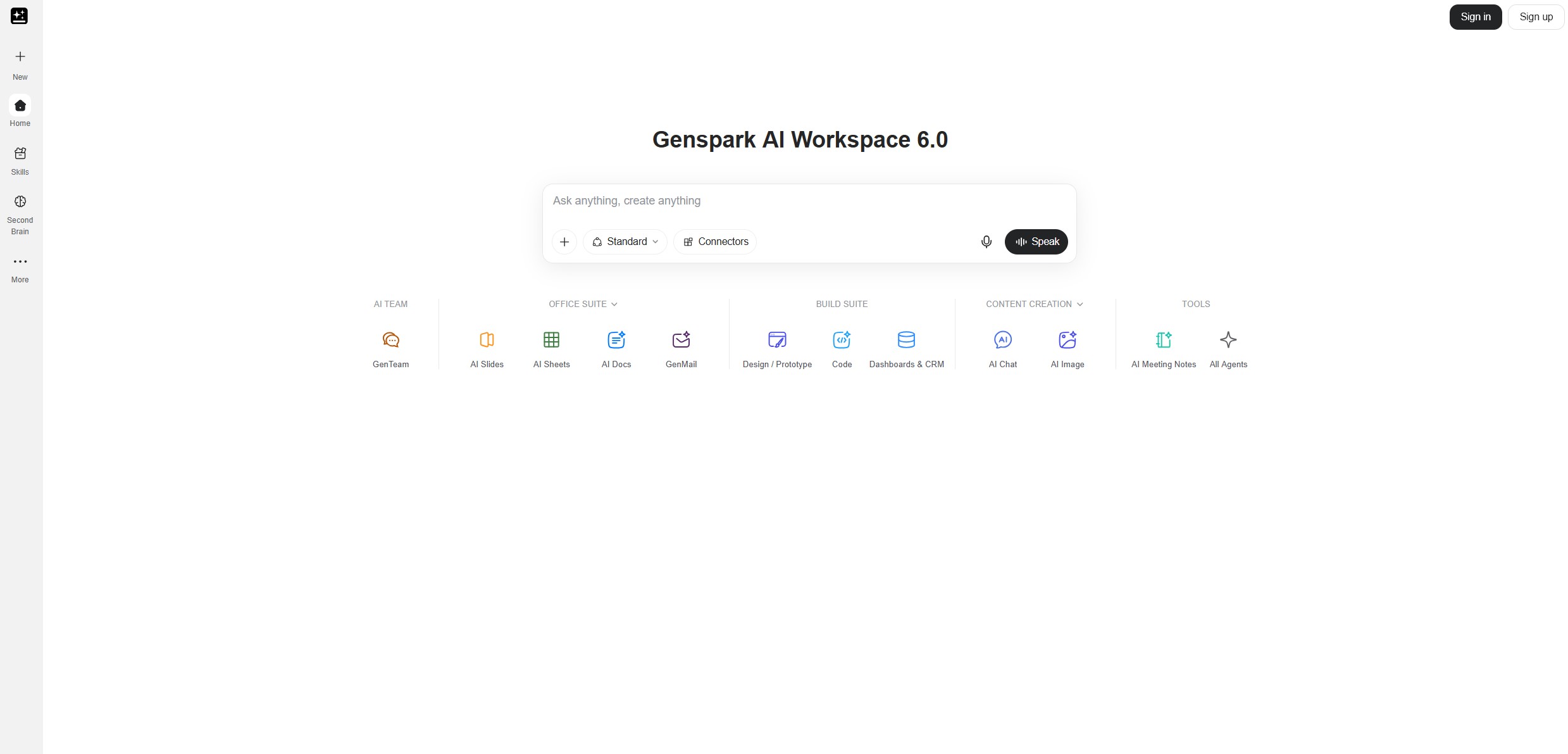
Artificial intelligence is changing the way people research information, create business documents, analyze data, prepare presentations, and manage everyday work. Instead of using separate applications for every task, professionals increasingly look for tools that can connect multiple stages of a project. Genspark is designed around this idea, bringing AI assistants, research capabilities, document creation, spreadsheets, presentations, and other productivity features into a unified workspace.
Genspark goes beyond the traditional chatbot model. Its AI agents are designed to work through multi-step requests, use available tools, gather information, and help turn an initial instruction into a more complete result. Depending on the feature being used, that result might be a research report, a presentation, a spreadsheet, a document, a website-related task, or another practical work product.
This approach can be useful for entrepreneurs, marketers, students, consultants, researchers, business owners, and teams that spend significant time collecting information and turning it into usable material. Rather than beginning every task manually, users can describe their objective and let the platform assist with the process.
Genspark also brings together capabilities from multiple AI models and specialized agents. That makes it worth considering if you want a broader productivity environment rather than a tool dedicated to only one activity. However, its usefulness depends on your workflow, the quality of the generated results, available usage credits, and the features included in your plan.
Explore Genspark AI
Discover AI agents, research tools, presentations, documents, spreadsheets, and productivity features in one workspace.
Explore GensparkWhat Is Genspark?
Genspark is an AI-powered productivity platform that combines conversational assistance with specialized tools and agents. It is intended to help users complete practical tasks, not just generate text in response to a question. Depending on the workflow, the system can help research a topic, organize findings, analyze information, create content, build presentations, or work with documents and spreadsheets.
One of its central concepts is the AI agent. An agent can take a request, break it into smaller steps, use available tools, and work toward a defined outcome. For example, a request to prepare a competitor analysis could involve finding relevant companies, gathering public information, organizing the findings, comparing products or pricing, and creating a report that can be reviewed.
The platform also offers specialized experiences for different kinds of work. AI Slides focuses on presentations, AI Sheets supports spreadsheet-oriented tasks, and AI Docs helps with documents. Other features cover research, coding, meetings, voice input, file storage, and additional workflows. Availability and capabilities can vary by plan and may change as the service develops.
Genspark is therefore best understood as a broader AI workspace. Instead of treating research, analysis, and content production as completely separate activities, it aims to make them parts of a connected process.
Key Features of Genspark
1. Super Agent for Multi-Step Tasks
Super Agent is one of the platform’s central features. It is designed to plan and carry out tasks that require more than a single response. Rather than simply answering a question, it can work through a sequence of steps using the tools and capabilities available to it.
This is useful when the objective is a finished deliverable rather than a short explanation. You might ask it to research a market, summarize a collection of documents, prepare a launch plan, organize information from several sources, or help develop a structured business report.
A good request explains the objective, the context, the expected format, and any constraints. For instance, instead of asking for information about a market, you could request a competitor analysis with a defined geographic scope, comparison criteria, source links, and a concise executive summary.
For more complex tasks, the agent may need time to work through the different stages. Review the output before using it, particularly when the work involves current facts, financial information, legal matters, or business decisions. AI assistance can reduce repetitive effort, but it does not eliminate the need for verification.
2. AI Research and Information Gathering
Research is a common starting point for many professional tasks. Before preparing a presentation, writing a report, or making a business decision, users often need to gather information from multiple sources and understand how the pieces fit together.
Genspark’s research-oriented workflows can help investigate a topic, organize findings, summarize important details, and produce a more structured result. This can be useful for market research, product comparisons, industry overviews, travel planning, academic exploration, and background research for content creation.
For example, a marketing professional could investigate a new customer segment, identify competing products, and prepare a summary of the main opportunities. A small business owner could compare software options or research the public positioning of competitors before planning a campaign.
Research quality depends on the question, the available information, and the sources used. Ask for supporting links or citations when factual claims matter, and check whether the evidence actually supports the conclusion. If the subject changes frequently, confirm the date of the information instead of relying on an undated summary.
3. AI Slides for Presentations
Creating a good presentation requires more than putting text on slides. A useful deck needs a clear narrative, logical structure, readable layouts, appropriate visual elements, and a consistent design. Preparing all these components manually can take considerable time.
AI Slides helps users turn a topic, objective, or set of source materials into a presentation. Users can describe the audience and purpose, supply documents, and let the system assist with research, outlining, slide creation, and visual design. The generated deck can then be reviewed and refined in the presentation workspace.
This can be valuable for sales presentations, project proposals, internal reports, business plans, educational material, training sessions, and investor pitch decks. It can also help users create a first draft when they know what they want to communicate but need assistance organizing the material.
Existing files and brand guidelines can be useful inputs. If a company has a preferred visual identity, provide the relevant instructions and review the resulting presentation for consistency. A generated deck should be checked for accurate figures, readable text, appropriate chart labels, and a logical flow from the opening slide to the conclusion.
Presentation export options can include formats such as PDF and PPTX, with additional options depending on the current feature set. Check the available export formats and editing controls before building a workflow around a particular file type.
Create Presentations with AI
Explore presentation workflows for reports, proposals, training material, and business projects.
Explore AI Slides4. AI Sheets for Data and Spreadsheets
Spreadsheets are essential for budgeting, reporting, planning, forecasting, and organizing business information. However, building formulas, cleaning datasets, creating charts, and interpreting results can be difficult for users who do not work with spreadsheets every day.
AI Sheets is designed to assist with spreadsheet-oriented tasks. Users can describe the analysis they need, organize information, and work toward a structured spreadsheet or data-driven output. Depending on the task and the available functionality, AI assistance can help with formulas, summaries, calculations, tables, and charts.
For example, a small business might want to categorize monthly expenses, compare sales by region, or create a simple forecast from historical data. A marketer might analyze campaign performance, while a project manager could organize deadlines, costs, and task status in a more structured format.
The important distinction is between helping with analysis and guaranteeing that the analysis is correct. Check formulas, source data, units, date ranges, and assumptions before relying on a spreadsheet. If the results will influence financial or operational decisions, validate important calculations independently.
For larger datasets, confirm that the platform supports the required file size, structure, and operations. Clean input data and clear instructions make it easier to produce useful results.
5. AI Docs for Reports and Written Work
AI Docs focuses on creating and working with written documents. It can support tasks such as drafting reports, structuring proposals, preparing summaries, organizing research, and developing longer pieces of business content.
Rather than starting from a blank document, users can provide a topic, outline, source files, or a description of the intended audience. The AI can then help develop the structure and produce a first draft that can be revised.
Potential applications include project briefs, internal procedures, research summaries, business proposals, meeting reports, training documents, and planning materials. The value is especially clear when a document requires collecting information from several inputs before turning it into a coherent narrative.
For better results, define the document’s purpose, target reader, approximate length, tone, and required sections. If the document must follow a particular format, provide an example or a detailed outline. After generation, check the facts, terminology, transitions, and consistency of the final version.
6. AI Chat and Access to Multiple Models
AI chat remains a useful part of Genspark. It provides a conversational interface for asking questions, exploring ideas, drafting content, explaining concepts, and solving everyday problems. The platform also offers access to multiple AI models, depending on the selected feature and plan.
Different models can perform differently on writing, reasoning, coding, research, or creative tasks. A model that is effective for summarizing a long document may not be the preferred choice for a complex coding task. Access to several options gives users more flexibility when comparing results.
However, access to many models does not automatically mean that every model is included without limits. Some capabilities may use credits or have separate usage restrictions. Review the current plan details and understand which actions consume credits before relying on a particular model for frequent work.
7. AI Image, Video, and Audio Generation
Genspark also brings generative media capabilities into its broader workspace. Depending on the current model catalog and subscription, users may be able to explore image creation, video generation, audio tools, and related creative workflows.
These capabilities can support social media campaigns, presentation illustrations, marketing concepts, product visuals, short video experiments, and other digital content. Having creative tools alongside research and document features can make it easier to move from an idea to a draft asset without constantly switching applications.
For example, a business could research a campaign topic, develop a presentation outline, and create supporting visuals as part of the same wider project. A content creator could use AI to explore several visual directions before selecting the material for further editing.
Output quality and supported controls depend on the specific model. Always review generated media for visual errors, inaccurate text, inconsistent objects, or other problems. If you plan to publish or monetize the result, check the applicable commercial-use terms and any restrictions associated with the model.
8. AI Drive and File-Based Workflows
Working with documents often involves more than one file. A business project might include spreadsheets, PDFs, presentations, research notes, and source documents stored in different locations. Collecting and organizing these files can become a task of its own.
Genspark’s AI Drive provides storage for files associated with supported workflows. Depending on the available integrations and features, users can work with stored materials and use them as context for research, document creation, and other tasks.
File-based workflows are useful when a task depends on existing information. For example, a user could provide a business plan and supporting financial data, then ask for a presentation that summarizes the main strategy and financial assumptions.
Before uploading sensitive documents, review the platform’s current privacy and data-handling policies. Also check storage limits, file-size restrictions, supported formats, and retention settings for your account.
9. Meeting Notes and Voice Input
Meetings often generate information that must be converted into action items, decisions, summaries, and follow-up messages. AI-assisted transcription and summarization can reduce the manual effort involved in reviewing long conversations.
Genspark includes meeting-related tools and voice input features in its wider productivity environment. Depending on the feature and plan, users may be able to transcribe supported audio, create summaries, or use speech to interact with AI tools.
These capabilities can help teams capture important discussion points, prepare meeting recaps, and organize follow-up tasks. They may also support individuals who prefer speaking their instructions instead of typing every prompt.
Transcription and summaries should still be checked for incorrect names, missing context, and inaccurate action items. Make sure participants are informed and that you have the appropriate permission to record or process meeting audio under the rules that apply to your situation.
10. Coding and AI-Assisted Development
Software development involves researching solutions, writing code, debugging errors, understanding unfamiliar projects, and documenting changes. AI assistance can help developers move through these tasks more quickly, particularly when they need a starting point or an explanation of an unfamiliar concept.
Genspark includes coding-oriented capabilities within its broader product environment. Depending on the feature, developers may use AI to explore ideas, generate code, investigate errors, prepare technical documentation, or assist with development tasks.
For example, a developer might ask for a small script to process a dataset, request an explanation of a function, or create a prototype for a simple application. A business user with limited programming experience could also explore whether an idea can be turned into a working proof of concept.
Generated code should be tested before deployment. Check dependencies, security implications, error handling, licensing, and compatibility with the intended environment. For production software, use normal development practices such as version control, code review, testing, and secure management of credentials.
Who Can Benefit from Genspark?
Entrepreneurs and Small Business Owners
Entrepreneurs frequently need to handle research, planning, marketing, presentations, financial organization, and customer communication with limited resources. An AI workspace can help reduce the time spent preparing initial drafts and organizing information.
Genspark may be useful for researching a market, preparing a business proposal, organizing a launch plan, or creating presentation material. Instead of treating every task as a separate project, users can build a workflow that connects research, analysis, and communication.
It is still important to distinguish between a useful draft and a verified business decision. Review market claims, financial assumptions, and operational recommendations before acting on them.
Marketing Professionals
Marketing work combines research, planning, copywriting, data analysis, presentations, and visual content. Genspark can assist with several of these stages, making it useful for teams that need to produce campaign material and reports regularly.
A marketer could research a target audience, outline a campaign, prepare content ideas, organize performance data, and build a presentation for stakeholders. These outputs can provide a starting point for the team’s own strategy and creative judgment.
Before publishing, review brand voice, product claims, factual accuracy, and visual consistency. AI-generated content should support a clear marketing strategy rather than replace audience knowledge or campaign testing.
Consultants and Researchers
Consultants and researchers often spend substantial time gathering information, comparing alternatives, synthesizing evidence, and presenting conclusions. AI-assisted research can help organize the initial work and create a more structured path from source material to report.
For example, a consultant could compare several software providers, summarize their features, and create a presentation for a client discussion. A researcher could use the platform to explore a topic, organize notes, and develop an outline for further investigation.
The main responsibility remains source verification. Confirm the underlying evidence, identify assumptions, and separate established facts from interpretation before delivering work to a client or publishing a report.
Students and Educators
Students can use AI tools to explore unfamiliar subjects, structure study notes, develop presentation outlines, and ask for explanations of difficult concepts. Educators may use similar tools to prepare teaching material, organize lesson plans, or create draft classroom resources.
The most productive approach is to use AI as a learning aid. Ask for explanations, examples, comparisons, or practice questions, then check the material against reliable course resources. Generated text should not be submitted as original academic work when doing so violates institutional rules.
For factual assignments, verify quotations, references, dates, and claims. AI can produce convincing but inaccurate information, so critical reading remains an essential skill.
Project Managers and Business Teams
Project managers need to organize tasks, deadlines, decisions, risks, and status updates. AI assistance can help convert unstructured notes into action lists, draft project summaries, or prepare stakeholder presentations.
For example, a manager could summarize project meeting notes, identify unresolved questions, and draft a weekly update. A team could also use AI to prepare a structured comparison of options before a planning session.
Team workflows should account for access permissions and the sensitivity of shared information. Confirm that connected applications and file permissions are configured appropriately before allowing an AI agent to work with business data.
How to Get Better Results from Genspark
Start with a Clear Objective
Describe the outcome you want rather than simply naming a broad subject. “Research competitors” is less useful than asking for a comparison of five competitors using defined criteria, with source links, a summary table, and recommendations for further investigation.
Provide Context and Constraints
Include the intended audience, project background, relevant documents, preferred tone, output format, and any limitations. If you need a presentation for senior management, explain which decisions the audience must make. If you need a spreadsheet, define the columns and calculations that matter.
Break Large Projects into Stages
Although an agent can handle multi-step tasks, complex work is often easier to review when divided into stages. You might first request research, then approve the findings, then create a report, and finally turn the report into a presentation.
This staged approach gives you opportunities to correct assumptions before they influence later outputs. It can also help you understand where the system is performing well and where additional instructions are needed.
Ask for Evidence and Assumptions
When accuracy matters, ask the system to identify sources, explain key assumptions, and distinguish confirmed information from estimates. Review the cited sources directly rather than assuming that the presence of a citation guarantees correctness.
Review the Final Deliverable
Check the result for completeness, formatting, accuracy, and suitability for its intended purpose. In presentations, verify chart labels and slide flow. In spreadsheets, inspect formulas and totals. In reports, check sources and conclusions. In code, run tests and review security implications.
Save Useful Workflows
If you repeatedly perform the same task, document the prompt, preferred format, and review criteria. Reusable workflows can help maintain consistency and reduce the effort needed to explain the same requirements every time.
Genspark Pricing and Plans
Genspark offers different plans for individual users and organizations. Plan structures can include usage credits, storage allowances, access to AI tools, and additional controls for teams. The appropriate option depends on how frequently you use the platform and which features your work requires.
The official plan information has listed a Free option for initial use, Plus and Pro subscriptions for individuals, and Team and Enterprise options for organizations. Features, prices, allowances, and promotional terms can change, so check the official pricing page before subscribing.
Free Plan
A free plan can be useful for exploring the platform, testing basic workflows, and deciding whether its approach fits your needs. Free access may include a daily credit allowance, limited access to selected models or agents, and a smaller AI Drive storage allocation.
If you are new to Genspark, start with a practical task that reflects your real needs. Try creating a short research summary, a presentation outline, or a simple document. This helps you evaluate the platform before committing to a paid subscription.
Plus Plan
The Plus plan is intended for individuals who want more regular access to the platform’s productivity tools. Depending on the current terms, it can include a monthly credit allowance, additional storage, access to more models, and expanded use of features such as AI Slides, AI Sheets, and AI Docs.
Consider this type of plan if you use AI frequently for everyday professional tasks but do not need the largest usage allowance. Check which models consume credits, which features have included usage quotas, and whether the available storage is sufficient for your files.
Pro Plan
The Pro plan is aimed at heavier users who need a larger allowance for more demanding workflows. It may be appropriate for professionals who regularly create presentations, analyze documents, generate media, or run multiple AI tasks as part of their work.
Before upgrading, estimate your actual usage. A higher allowance is useful only if you need it. Compare the price difference with the time saved and the number of tasks you expect to complete each month.
Team and Enterprise Plans
Organizations may need shared administration, centralized billing, usage reporting, connector management, and stronger identity or governance controls. Team and Enterprise plans are designed for these broader organizational requirements, with specific features depending on the selected tier and contract.
Businesses should review data-handling commitments, access controls, account management, support arrangements, and any required compliance documentation before adopting the platform across a team.
Check Current Genspark Plans
Compare available plans, usage allowances, storage, and features to find an option that matches your workflow.
Explore GensparkUnderstanding Credits and Usage Limits
AI platforms can use different billing methods for different operations. A subscription may include a monthly credit allowance, while particular models or complex tasks consume credits at different rates. Some tools may also provide a separate included quota for standard operations.
This means the subscription price alone does not always tell you how much work you can complete. A short text request may have a different cost from a complex research task, a presentation, or media generation using a resource-intensive model.
Before choosing a plan, identify the tasks you expect to perform most frequently. Review the credit cost of those tasks and estimate how many times you will run them. If you regularly create long presentations or use advanced models, test a representative workload so you can estimate the actual monthly requirement.
Also consider how often you need to repeat or revise a task. A first draft may require several iterations before it is ready for use. Budgeting for revisions gives you a more realistic picture than calculating costs based only on a single successful generation.
Genspark Compared with Traditional AI Chatbots
Traditional AI chatbots are useful for answering questions, generating text, explaining concepts, and brainstorming. Genspark also offers conversational assistance, but its wider workspace places additional emphasis on agents, specialized productivity tools, and the creation of deliverables.
| Consideration | Genspark | Basic chatbot workflow |
|---|---|---|
| Primary approach | AI workspace with agents and specialized tools | Primarily conversational assistance |
| Multi-step tasks | Designed to plan and execute supported workflows | Often requires more manual prompting and coordination |
| Presentations and documents | Dedicated creation workspaces | May require separate tools for editing and export |
| Data analysis | Spreadsheet-oriented tools and workflows | May require additional spreadsheet work |
| Model selection | Access to multiple models, depending on plan and feature | Depends on the selected chatbot service |
| Best fit | Users who want connected research and production workflows | Users who mainly need direct conversational help |
Neither approach is automatically better for every user. If you mainly need short answers or occasional writing help, a simpler chatbot may be enough. If your work regularly involves research, spreadsheets, presentations, documents, and multi-step tasks, a broader workspace may be worth testing.
Privacy, Security, and Responsible Use
When using an AI workspace, consider what information you share and how the service handles it. Business documents, customer information, internal reports, and confidential project files may require stronger safeguards than public research material.
Review the current privacy policy, data retention terms, model-processing arrangements, and available security controls. Business users should check the plan-specific commitments rather than assuming that every subscription provides the same protections.
When connecting external applications, review permissions carefully. An integration should have only the access required for its intended task. Keep account credentials secure and avoid sharing confidential information in prompts unless the platform’s policies and your organization’s rules permit it.
AI-generated content also requires responsible review. Check factual claims, references, calculations, and any content that could affect a business decision. For public-facing work, review copyright, licensing, confidentiality, and disclosure requirements where applicable.
Potential Limitations to Consider
Genspark brings multiple tools into one environment, but a unified workspace does not eliminate the limitations of generative AI. Research outputs can contain errors, summaries may omit important context, and generated documents can include unsupported statements. Spreadsheets and calculations should be checked before they are used for important decisions.
Multi-step tasks can also take time, particularly when they require research or several stages of processing. Some results may need refinement before they meet professional standards. Users should expect to review the work rather than treating every generated deliverable as final.
Another consideration is usage management. Different tools and models may have different credit costs, limits, or availability. If your workflow depends on a particular model or export format, verify that it is available under your plan before building a process around it.
Finally, not everyone needs an all-in-one platform. If you already have a specialized tool that performs one task exceptionally well, compare the convenience of consolidation against the quality, cost, and controls of your current setup.
How to Get Started with Genspark
- Open the official platform. Visit Genspark and review the available workspace features.
- Choose a practical task. Start with something you already need to do, such as researching a topic, preparing a report, or creating a presentation.
- Describe the desired outcome. Include the objective, intended audience, preferred format, and any constraints.
- Provide relevant source material. Where supported, use documents or files that give the AI the necessary context.
- Review the first result. Check accuracy, structure, completeness, and whether the output meets your requirements.
- Refine the deliverable. Give specific feedback and request targeted changes rather than restarting without a clear reason.
- Evaluate your usage. Monitor credits, storage, and the time saved before deciding whether a paid plan is worthwhile.
Starting with a real task makes it easier to evaluate the platform’s practical value. You can determine whether it reduces repetitive work, improves the quality of your first drafts, or makes it easier to connect research and content production.
Ready to Explore Genspark?
Explore AI agents, research, presentations, spreadsheets, documents, and productivity tools in one connected workspace.
Visit GensparkFrequently Asked Questions
What is Genspark used for?
Genspark is an AI workspace for research, multi-step tasks, document creation, presentations, spreadsheets, coding assistance, and other productivity workflows. Its tools can help users move from an initial request to a more structured deliverable.
What is Super Agent?
Super Agent is an AI assistant designed to plan and carry out multi-step tasks using available tools. It can help with research, content creation, analysis, and other supported workflows, with results that should be reviewed before use.
Can Genspark create PowerPoint presentations?
Genspark’s AI Slides feature can help generate and refine presentations. Supported export options can include PPTX and PDF, but you should confirm the current formats and editing capabilities in the platform.
Can Genspark work with spreadsheets?
AI Sheets is designed for spreadsheet-oriented tasks, including organizing data and assisting with analysis. Review formulas, totals, assumptions, and the source data before relying on the results.
Does Genspark have a free plan?
Genspark has offered a free plan with limited credits and storage. The current allowance and included features can change, so check the official plan information before creating an account or choosing a subscription.
How much does Genspark cost?
The platform offers different plans for individual users and organizations. Pricing and included usage vary by tier, so consult the current pricing page for monthly costs, annual billing, credits, storage, and feature limits.
Is Genspark suitable for businesses?
It can be useful for businesses that want AI-assisted research, reports, presentations, spreadsheets, and multi-step workflows. Organizations should review the available team features, administrative controls, privacy terms, and security commitments before wider deployment.
Can Genspark help with coding?
Genspark includes coding-oriented capabilities that can assist with generating code, exploring technical ideas, explaining errors, and supporting development tasks. Always test generated code and review security, dependencies, and compatibility before deployment.
Can Genspark generate images and videos?
The platform includes generative media capabilities, with access depending on the current model catalog and subscription. Supported formats, generation limits, and credit costs can differ between tools.
Is Genspark a replacement for other AI tools?
It may reduce the need to switch between multiple applications for some workflows, but it is not necessarily a replacement for every specialized service. Compare the features, output quality, pricing, and controls that matter to your particular work.
Are Genspark’s results always accurate?
No AI system should be assumed to be error-free. Verify factual claims, source references, calculations, and important conclusions. Human review is especially important for professional, academic, financial, and other high-impact tasks.
Discover More AI Tools on CatalogSpot
Genspark is one option for people exploring AI-assisted productivity and research. If you are comparing tools for software development, content creation, automation, and other digital workflows, visit the CatalogSpot AI Tools directory to discover additional platforms and find services that match your needs.